
This article explains how eligible contractors can use Deel Advance to get short-term cash advances.
Deel Advance is not a loan - there is no interest rate, and we do not run any credit checks. The advance is an agreement with Deel to advance funds to you now, in exchange for an agreed amount of your future earnings, which is collected automatically from your scheduled client payments.
Before Starting
- Deel Advance is available only to users in the Contractor role
- Requests are funded instantly once approved
- All advances are in US dollars (USD). If you withdraw or repay in another currency, the standard FX rate applies
- You may take up to 10 advances per pay cycle (limited by your available advance amount)
- Fees are shown on-screen before you submit the request.
How to Request a Deel Advance
✅ Step 1 – From Home, find the Deel Advance card in the Balance section and select Add
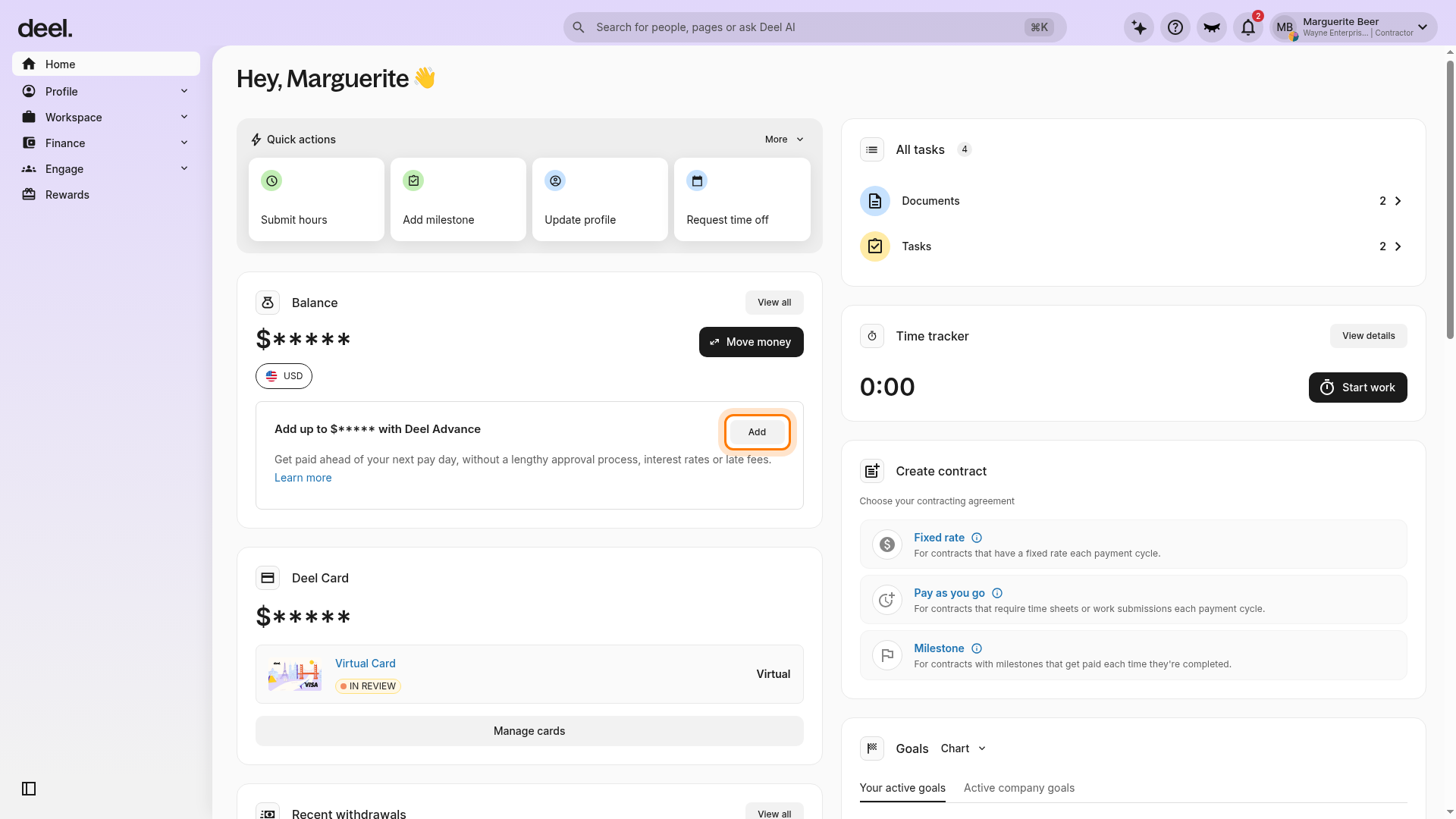
Go to Home in the left sidebar. In the Balance section, locate the card that begins Add up to and ends with with Deel Advance, then select Add on the right side of the card.
If a promotional or announcement pop-up covers the dashboard, select the X in its upper-right corner to close it. Do not select options such as Start tour or Show me unless you want to view the promotion.
✅ Step 2 – Review the Deel Advance request form
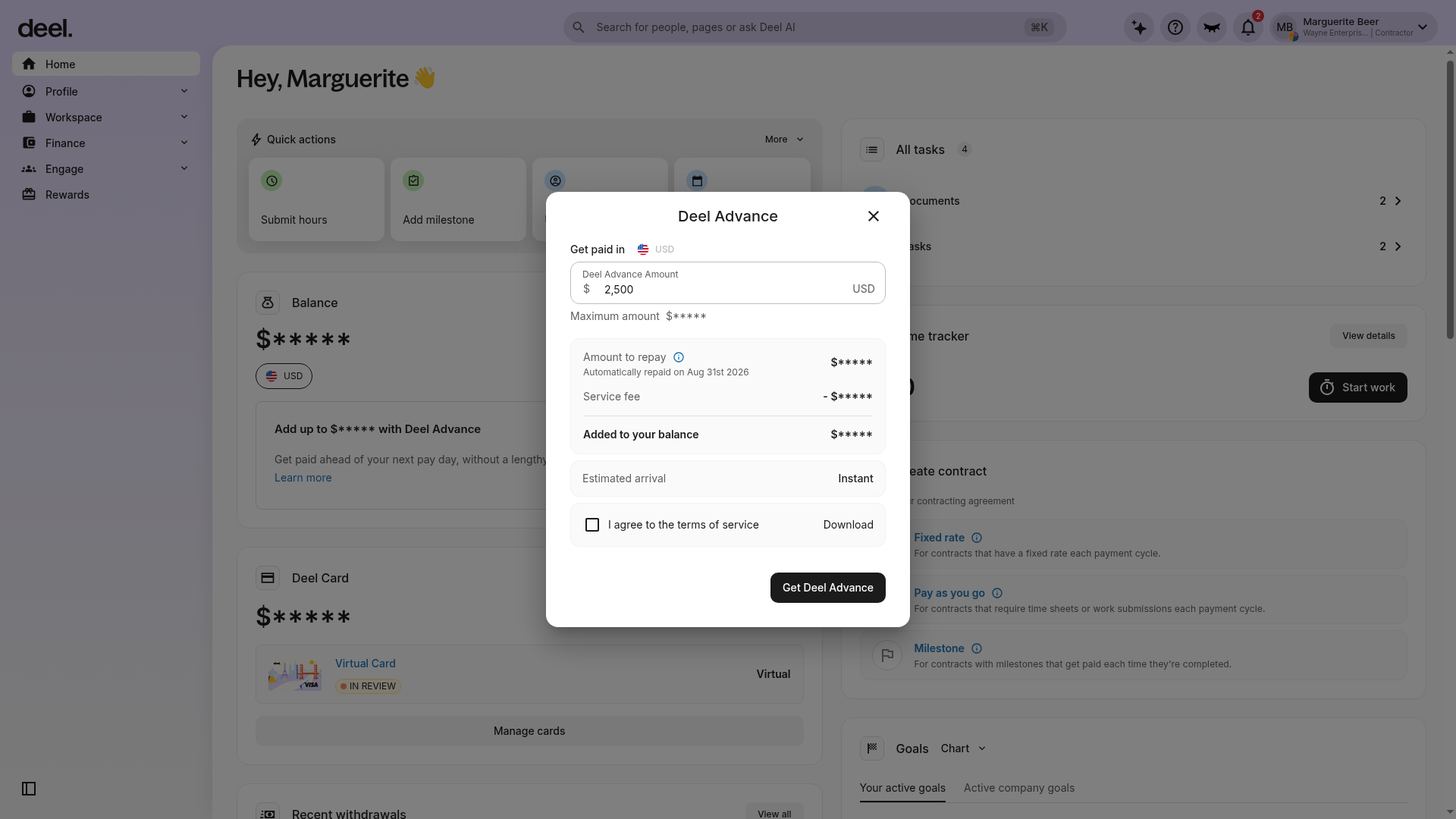
When the Deel Advance request form opens, verify the Deel Advance Amount field, your account-specific Maximum amount, the amount to repay, the service fee, and the amount added to your balance. The Get Deel Advance button appears inside this form.
✅ Step 3 – Enter the advance amount you want to request
Our internal algorithm will determine your maximum advance amount. Your personal limit will be visible on the Deel Advance request screen.
You must be receiving regular payments on your contract in recent months for us to calculate your limit.
The maximum advance amount possible is $10,000 USD. Deel Advances are always given in US dollars.

Deel reserves the right to make changes to any Advance limits for any user at any given time to align with our company risk policies and market conditions. You may notice fluctuations to your allowable advance limit periodically as a result.
✅ Step 4 – Agree to Terms of Service
Review the repayment and service-fee details, then select I agree to the terms of service before proceeding.
You can only have one advance outstanding at a time.
Once your Advance is repaid, you will have the option to request a new one.
You can take up to 10 advances within one pay cycle. Each advance you take will be subtracted from this total until you have exhausted the funds available for the pay cycle.
✅ Step 5 – Click Get Deel Advance to submit your request
The new balance with your Advance included will be available for withdrawal immediately once approved.
Frequently Asked Questions
[ACCORDION] Why can't I see Deel Advance on the Home dashboard?
The feature is available only for contractors who meet eligibility criteria. Confirm you are in the Contractor role and look for the Deel Advance card in the Balance section of Home.
[ACCORDION] How quickly will I receive the funds?
Approved advances are credited to your Deel balance instantly.
[ACCORDION] Is there interest in the advance?
No. A fixed fee is displayed before you submit the request; no interest accrues.
[ACCORDION] Can I repay early?
Repayment is collected automatically from scheduled client payments. Early repayment is not required but can be arranged through Deel Support.
[ACCORDION] What is the maximum I can request?
The limit is up to $10,000 (USD), but your personal maximum depends on your recent payment history.