
This article explains the Deel Premium service and how it provides additional protection against misclassification.
In this article:
Deel's Misclassification Guarantee
What is Deel Premium?
Deel Premium is an extra layer of protection against steep financial penalties for contractor misclassification.
With Deel Premium, you are protected up to a limit of $25,000 USD per contract and $250,000 USD per client.
Deel Premium also covers:
-
legal costs
-
tax authorities penalties
-
3rd party indemnity (up to $10,000)
Employers typically pay taxes and other national insurance contributions for full-time employees, but these fees may not apply to independent contractors. If a contractor is misclassified, the company may face penalties imposed by international tax organizations.
In the United States, for example, a business may incur fines of up to $10,000 USD if authorities discover misclassification.
You can read more in our blog: Misclassification of Independent Contractors Guide.
How much does Deel Premium cost?
Deel Premium costs $50 USD in addition to the standard $49 USD monthly contract fee.
You can cancel your plan by providing Deel with at least 30 days written notice.
Deel's Misclassification Guarantee
If you have purchased a valid Deel Premium Plan, the Misclassification Guarantee applies when a contractor you hired through Deel is deemed by a court of law to be an employee and not an independent contractor.
In this situation, Deel will reimburse you for:
- legal defense costs that result from the misclassification of a contractor or employee hired using the Deel Platform
- Your liabilities, interest and penalties payable to tax authorities as a result of the contractor or employee misclassification, up to a maximum limit of $25,000 USD per contractor.
Reimbursement is subject to the exclusions contained in our Terms & Conditions. Please see the Frequently Asked Questions section for more information.
How do I sign up for Deel Premium?
Jump to video tutorial
To be eligible, you must be a client admin with permission to add people and manage contracts for your organization.
You must use the standard Deel contractor agreement with no amendments or changes.
You must also be hiring a contractor outside the country in which you are based.
Please confirm that the contractor's country is eligible for Deel Premium. Some countries may not be available for Deel Premium.
You can always add Deel Premium to an eligible existing contract.
To add Deel Premium when creating a new contract:
- In the left sidebar, select People to expand its menu, then select Directory.
- On the Directory page, select Add people and then select Individual contractor.
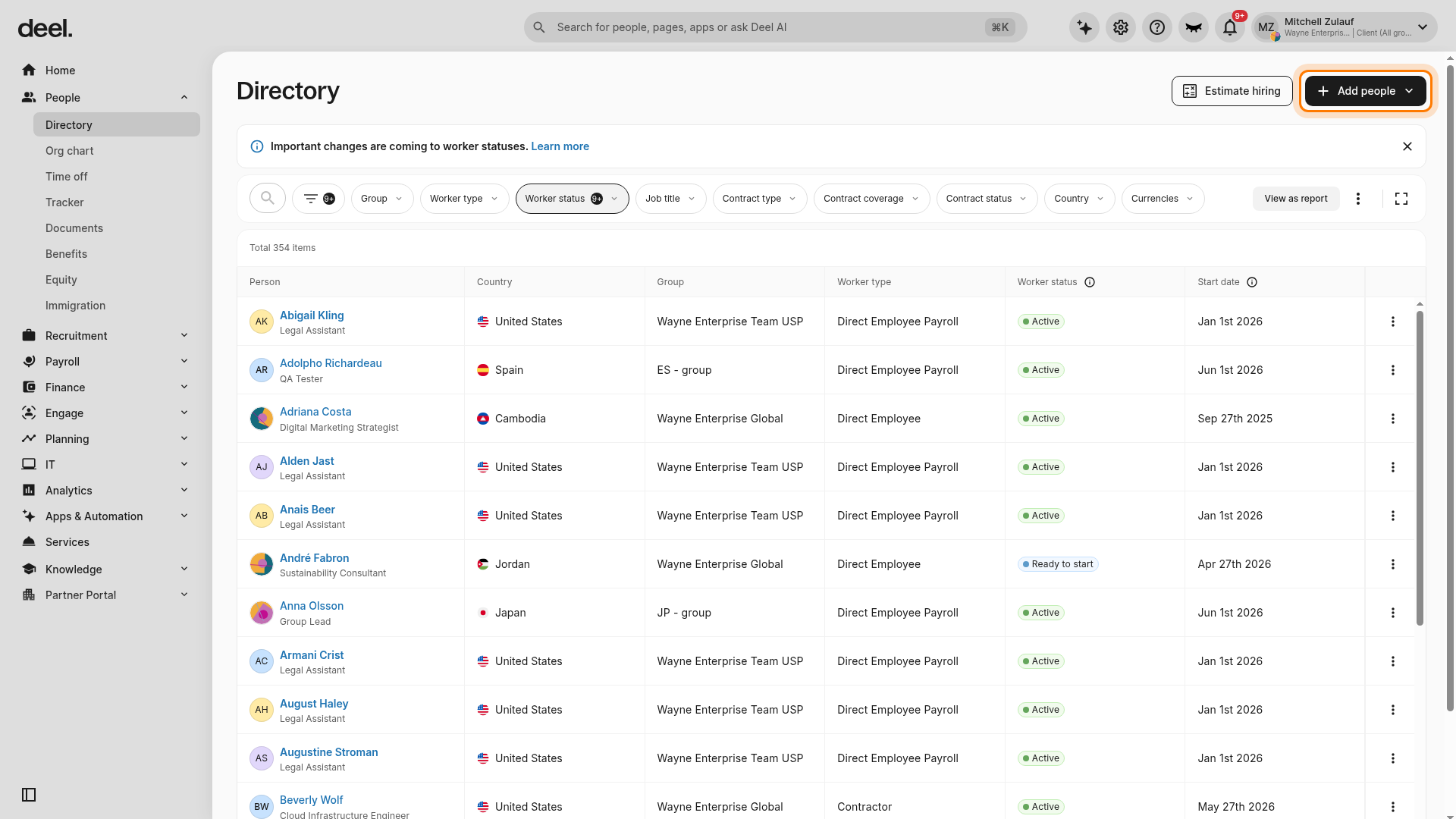
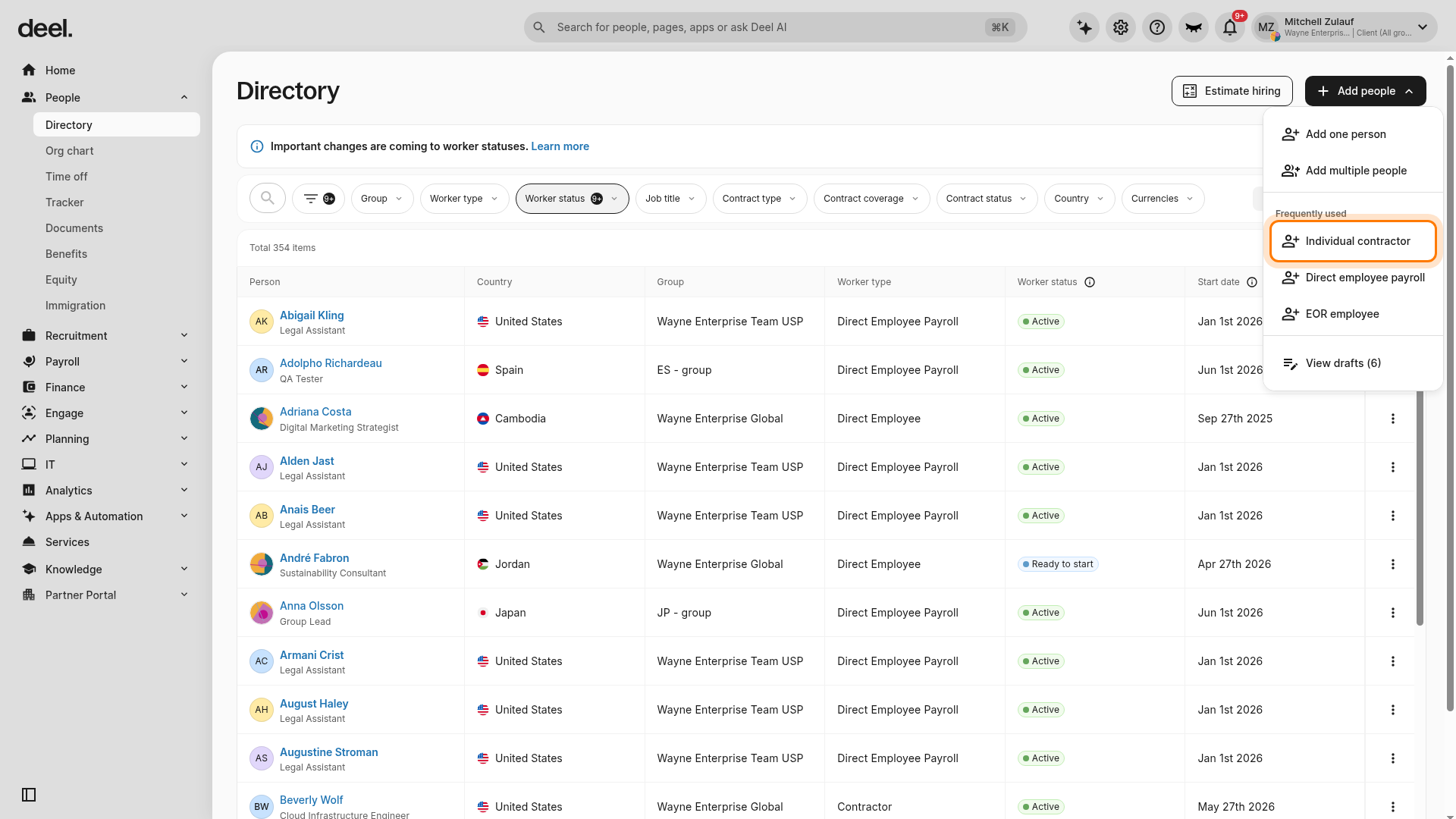
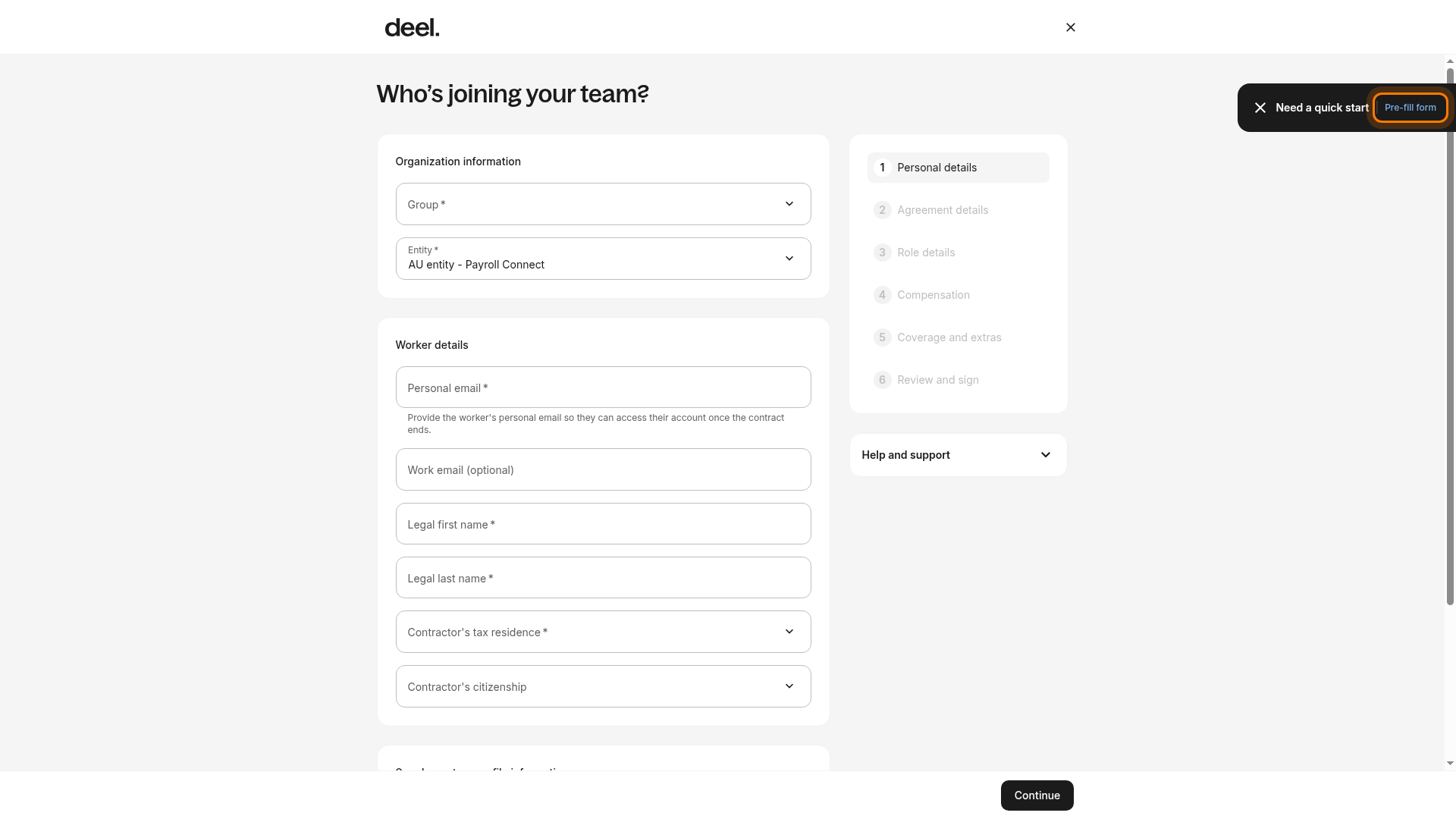
- On Who’s joining your team?, enter the contractor's details. If Pre-fill form is available, you can use it for a test or draft workflow; use the contractor's actual information when creating a real contract.
- Select a valid Group. Pre-fill form does not select a group.
- Confirm that Group, Entity, Personal email, Legal first name, Legal last name, and Contractor’s tax residence are completed, then select Continue.
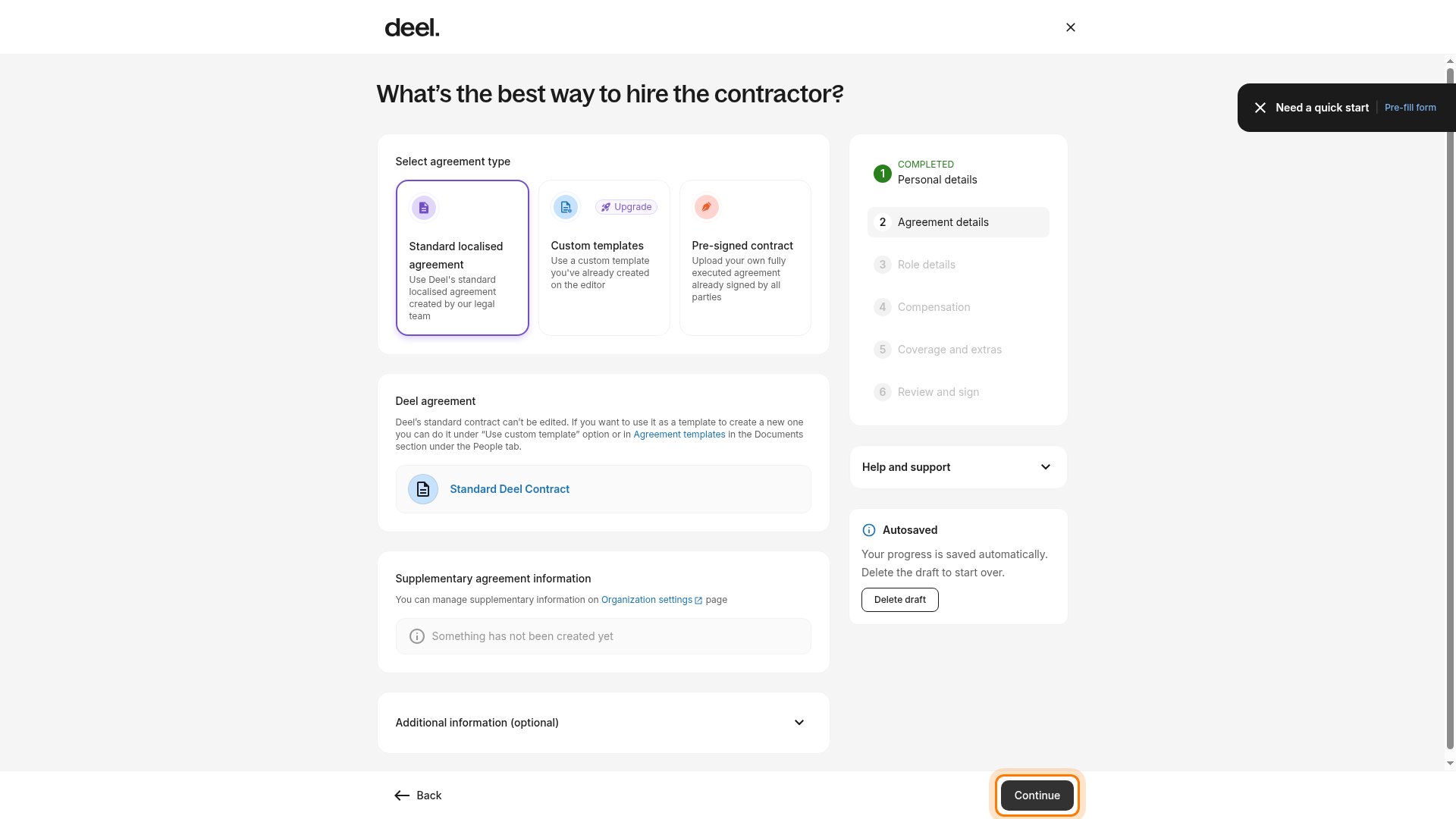
- In Agreement details, select Standard localised agreement and select Continue. Deel Premium requires the standard Deel agreement without amendments.
- In Role details, provide a Description of scope of work, then select Continue. Role and Seniority level are optional.
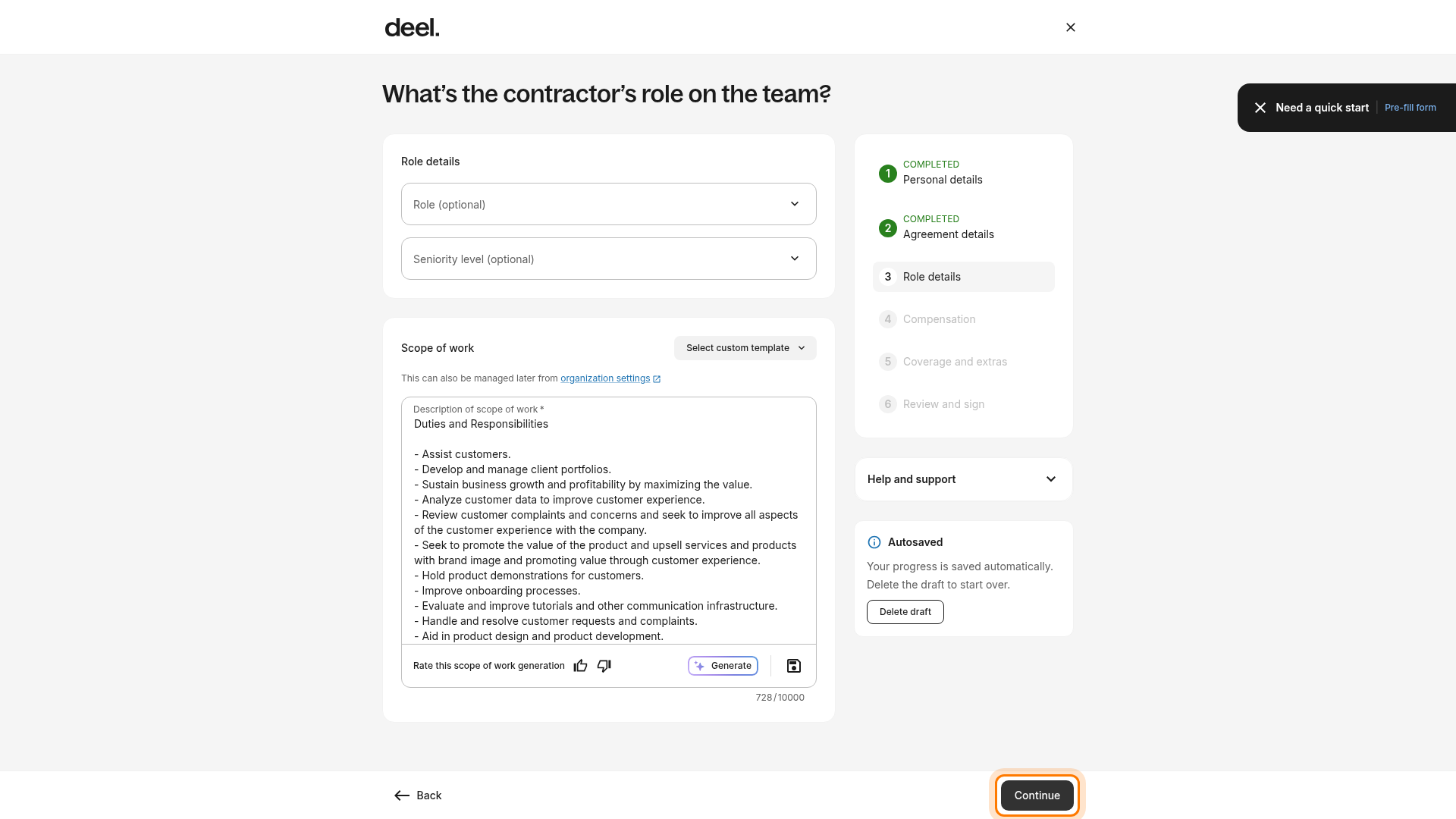
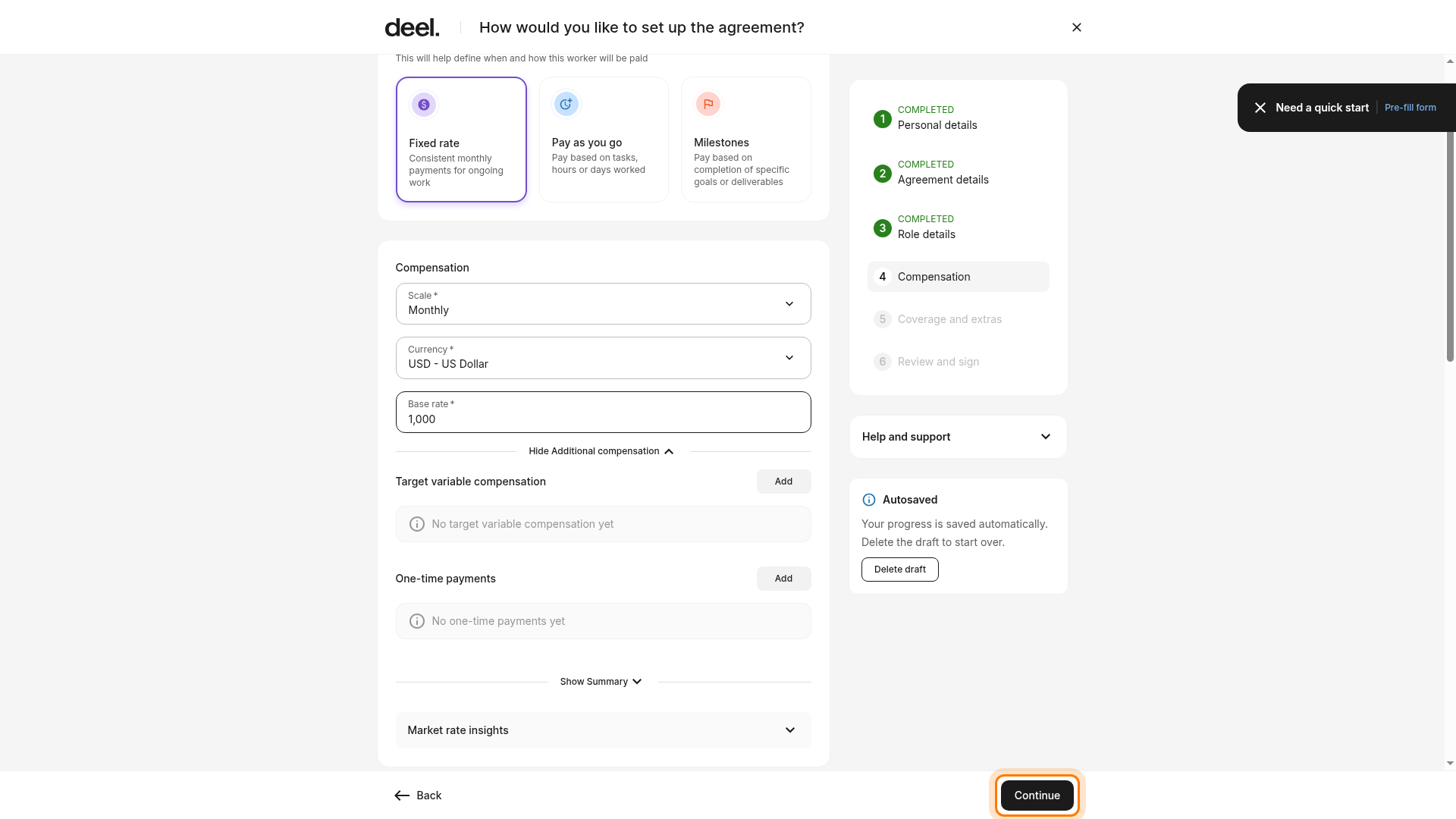
- In Compensation, choose the appropriate contract type. For the fixed-rate path, select Fixed rate, enter a Base rate, confirm the scale and currency, and select Continue.
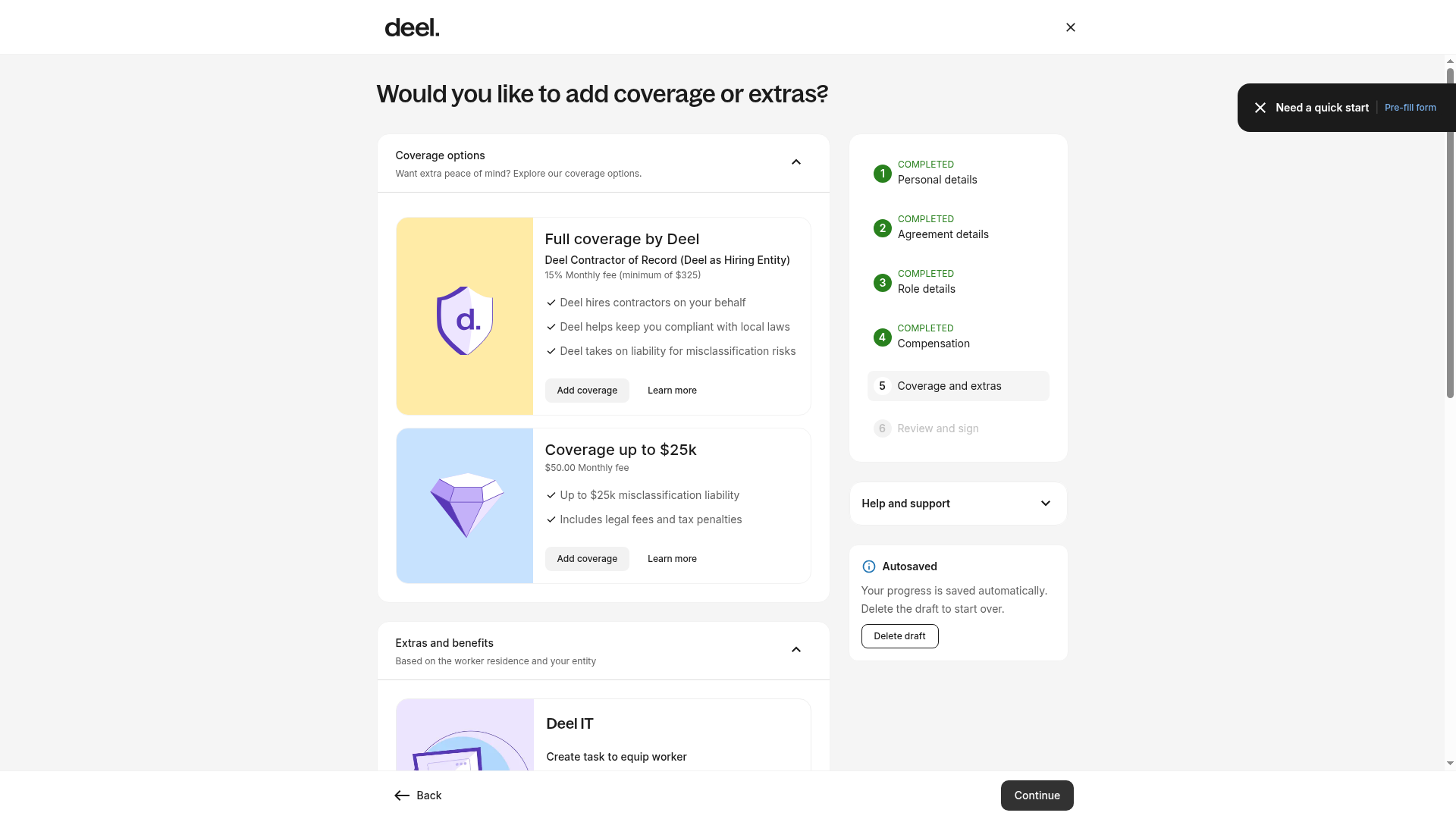
- On Would you like to add coverage or extras?, confirm that steps 1–4 are marked Completed and that Coverage and extras is active. Under the coverage option for Coverage up to $25k, select Add coverage to add Deel Premium.
- Complete the eligibility questionnaire and finish the contract creation flow.
Deel will conduct a brief eligibility check.
The contractor-creation workflow saves progress automatically. You can leave and return to the draft; do not select Delete draft unless you intend to discard it.
To add Deel Premium to an existing contract:
- In the left sidebar, select People to expand its menu, then select Directory.
- Select the contractor and open their contract.
- In the Deel Premium / Deel COR section, select Upgrade for X% / month.
- Review the eligibility assessment in step one of the upgrade wizard.
- Review the updated contract details in step two.
- Sign the new contract in step three.
- Confirm the contract status shows Deel Premium after completing the wizard.
If the Upgrade button is missing, verify the contract is active and that you have the required permissions to manage contracts.
Frequently Asked Questions
Does this mean that an existing Deel contract without Deel Premium is risky?
The standard Deel contract and compliance documentation are designed to mitigate as much risk as possible when working with international contractors.
Deel Premium is essentially an additional layer of due diligence in the event that a case of misclassification is made against you. You'll be protected from legal fees and tax liabilities up to $25,000 per contractor.
Why was my request denied to upgrade to Deel Premium?
A request to upgrade may be rejected for a few different reasons. The most likely reason is that you don’t meet the eligibility criteria. You can still continue with your existing contractor agreement, or you could consider the Employer of Record model.
How is Deel Premium different from Deel Contractor of Record (COR)?
With Deel COR, Deel hires the contractor on your behalf. With Deel Premium, you still hire the contractor and sign the agreement with them, but you are protected in the event of misclassification legal action.
How do I cancel my plan?
Yes, you may cancel your Deel Premium plan by providing Deel with at least 30 days written notice prior to the end of any Term of your Premium plan.
The Term of your plan is generally either one year, or the remaining length of the applicable covered contract.
You may cancel your Deel Premium Plan by opening the contract in your Deel account, opening the Deel Premium section, and then clicking Downgrade contract. Follow the on-screen steps.
If a contractor's agreement gets canceled, Deel Premium will automatically be canceled too. Because every contract has a 30 day notice period, you will pay a prorated rate for the contractor's last month plus 30 days notice.
What if there is a change of classification laws in my country?
Deel will notify you if there is a change in your country related to classification laws for contractors or employees. Once you receive our notification, you must retake Deel’s Questionnaire within 90 days of notification to remain eligible for the misclassification guarantee under the Premium Plan.
Failure to complete and pass a new Questionnaire may result in the termination of your Deel Premium Plan.
When is Deel’s liability excluded under the Misclassification Guarantee?
Deel’s liability is excluded in certain situations detailed in full in our Terms & Conditions.
Some exclusions have been provided below for your convenience. Deel is not liable for any losses that you incur due to any of the following actions, among others described in our Terms & Conditions:
- The use of any contract not provided or approved by Deel.
- You have been notified about a change in the applicable laws of your country and you have not retaken and completed your Questionnaire within 90 days after notification
- A change in the applicable laws of your country after the expiration or termination of your Misclassification Guarantee package.
- Any violation of law or other criminal, fraudulent, negligent or malicious acts taken by you or any Contractor.
- Any Contractor engaged outside of the Deel platform or after the expiration or termination of your Misclassification Guarantee package.
What do I do if a misclassification claim is made against me?
If you receive notice of a misclassification claim against you, you should contact Deel immediately.
Deel reserves the right to try to directly resolve any issues with any tax authority or governmental body or court directly, if applicable. Deel may assume control of the legal defense, appeal, or settlement of a claim.