
This article explains how to propose wording edits to an employee’s Employment Agreement in Deel - a process known as redlining. You can add or remove clauses, adjust agreement language, and leave comments for review. All changes are reviewed by Deel before they take effect to help ensure compliance with local regulations.
Note: If you only need to update specific contract fields, such as salary, job title, or working hours, use the standard contract change request flow instead of this redlining process.
Before you begin
You must be:
- A client admin or manager with permission to view employee contracts and request contract changes.
- Have an applicable employee with an uploaded, viewable agreement.
- Be aware that requesting wording changes may delay onboarding and should be done only when strictly necessary.
Important: In the current interface, the worker type may appear as Direct Employee or Direct Employee Payroll rather than Deel Employee. Use the relevant employee type shown in your Directory.
How to request changes to clauses of the Employee Agreement
Step 1 - Open the employee profile
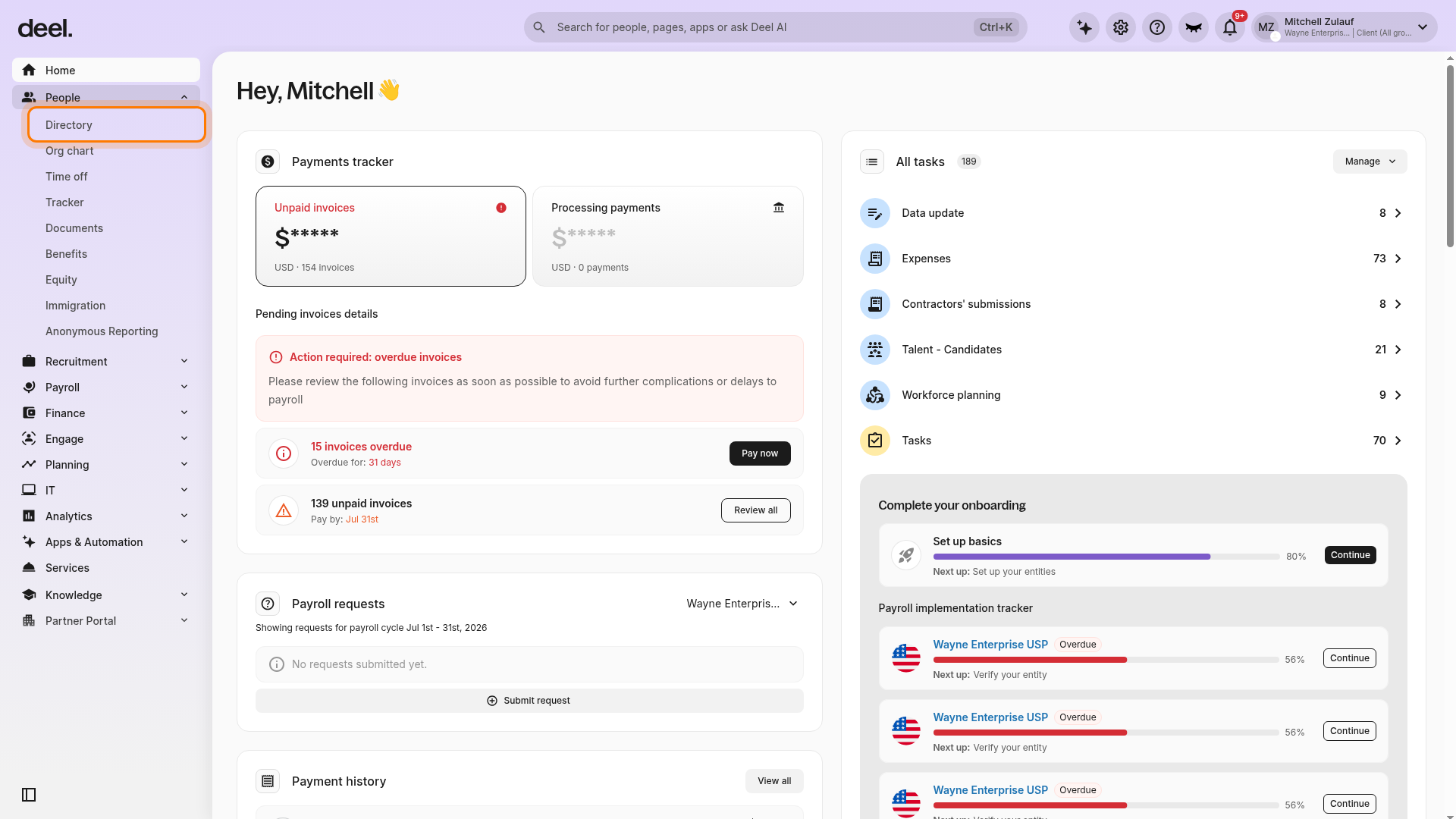
- In the left sidebar, click People to expand the menu.
- Click Directory.
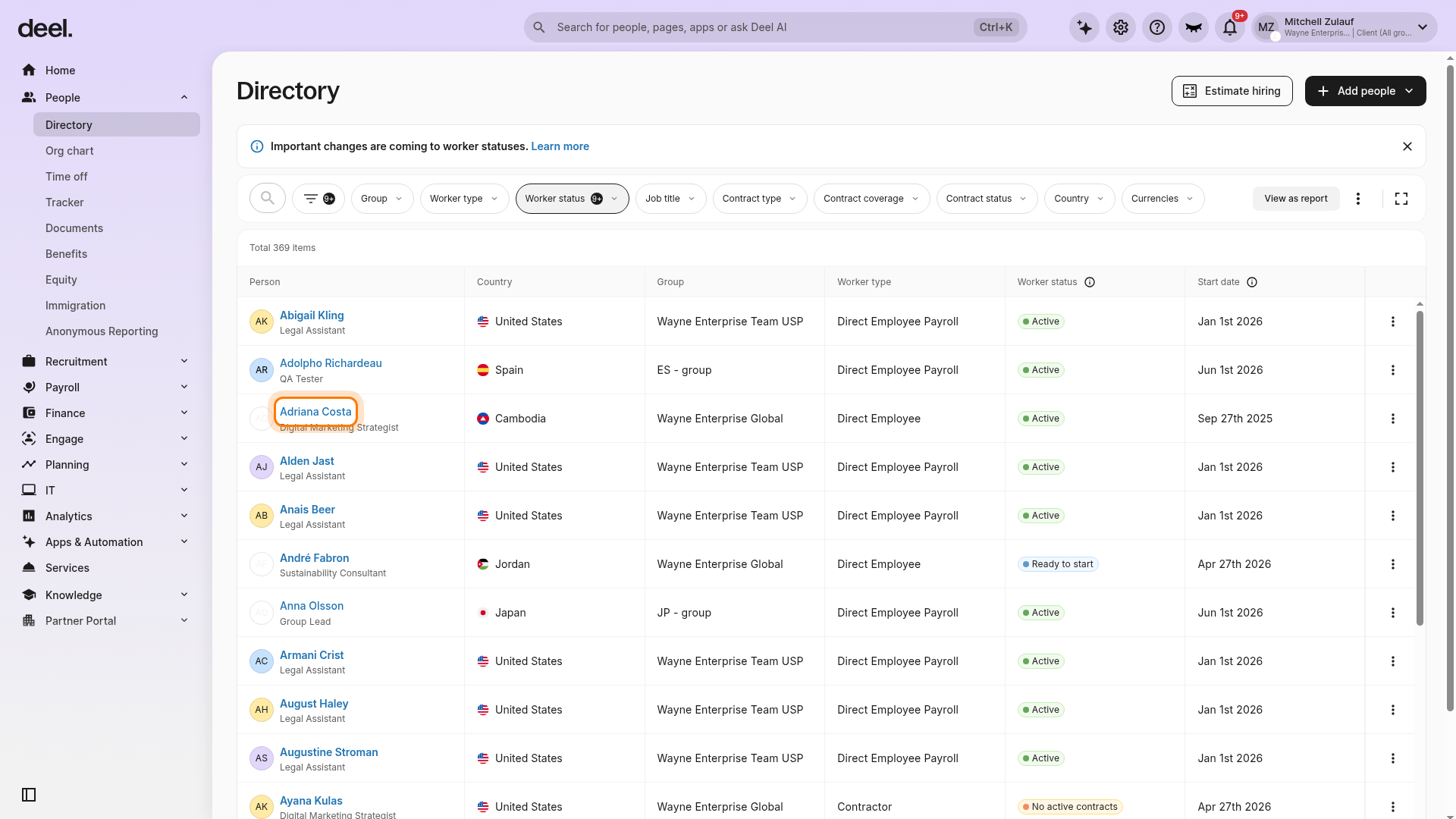
- In the Directory table, locate the employee whose agreement needs wording changes.
- Use the Worker type column or its filter, if needed, and select an applicable employee type such as EOR employee.
- Click the employee’s name.
Step 2 - Edit Worker Details
On the employee profile, edit worker details on top. The Request changes window opens with a list of change types on the left.
Step 3 - Select Edit agreement wording
- In the left-hand list in the Request changes window, scroll to the bottom.
- Select Edit agreement wording.
The Edit agreement wording editor opens. This option lets you edit contractual text, add or remove clauses, and leave in-document comments.
Step 4 - Modify the Employment Agreement wording
- Choose the agreement template to refine.
- Edit or add clauses directly in the Google Docs-style editor.
- Use Google Docs Comments to highlight proposed changes and mention colleagues to invite collaboration.
- Select where the redlines should apply: Apply to this employee or Create a client template.
Important: Employee-specific terms, such as probation period or notice period increases, cannot be approved in a client’s master template. These terms affect deposits and must be managed per employee. Use Apply to this employee for these changes.
Step 5 - Set an effective date and submit
- Select the Effective date field and choose when the updated wording should apply.
- Review the summary pane to confirm all edits.
- Click Continue, then Submit. Deel will review the request and notify you once approved.
Frequently Asked Questions
Can I submit a new change request while one is pending?
Only one active change request is allowed per agreement at a time. Wait for any pending request to be resolved before submitting a new one. Also confirm that you have permission to request contract changes and that the employee has a viewable agreement.
What should I do if an employee has no uploaded agreement?
If Agreement and signatures displays No uploaded employment agreement or No agreement file provided, return to People > Directory and select another applicable employee with View agreement available. If all applicable employees have no agreement file, ask the contract owner or an administrator to upload the agreement, then restart this workflow.
Why does Deel use Google Docs for redlines?
Deel uses Google Docs for documents with active redlines. This allows easy collaboration and version control throughout the review process.
Why do employment agreement templates differ by country?
EA templates are tailored to comply with local laws, which creates differences between countries. All templates are locally compliant and have been reviewed by Deel’s in-house legal team or external legal partners.
Troubleshooting
| Problem | Did you try? | How to fix |
|---|---|---|
| Request changes is not visible on the agreement page | Confirming that no other change request is active | Check the Tracker for pending requests and wait for resolution before submitting a new one. Also verify that your role can request contract changes. |
| View agreement is not available on the Contracts page | Checking Agreement and signatures | If the panel shows No uploaded employment agreement or No agreement file provided, select another applicable employee with a viewable agreement. If no applicable employee has one, ask the contract owner or an administrator to upload the agreement. |
| Edits were rejected by Deel | Reviewing whether the proposed clause conflicts with local labor law | Contact your Customer Success Manager for guidance on compliant alternatives. |
| Employee cannot be found in Directory | Using search or the worker-type filter | Go to People > Directory, then search for the employee by name or filter the Worker type column for the relevant employee type, such as Direct Employee or Direct Employee Payroll. |
| The Edit agreement wording option is unavailable | Confirming that the agreement is viewable and the change-request window opened | Verify that the employee has View agreement available and that you have permission to request agreement changes. |