
When using Deel Payroll - US to pay direct employees, it's essential to stay compliant with federal and state tax regulations.
This article explains how to manage your Tax IDs, register in new states, and authorize Deel to file taxes on your behalf using Third Party Administrator (TPA) access and provides guidance on resolving rejected or failed tax filings.
In this Article
How to Update Rate Information in the Deel App
How to Resolve Rejected Filings
What Are Tax IDs?
Tax IDs, including EANs, EINs, and Account Numbers, are identifiers required by federal, state, and local agencies to ensure payroll filings and payments are matched to the correct employer. These include:
- FEIN (Federal Employer Identification Number) for federal reporting
-
State and Local Tax IDs for:
- State Withholding Tax (SIT)
- State Unemployment Insurance (SUI)
- Paid Family & Medical Leave (PFML)
- Local taxes such as Employee Income Tax (EIT), Local Services Tax (LST), or Occupational Privilege Tax (OPT)
You’ll need tax IDs in every jurisdiction where your employees live or work.
Client Responsibilities
Clients are responsible for:
-
Adding or updating tax registrations
This includes Tax IDs, account numbers, rates, filing/payment frequencies, SOC Codes, and risk class codes. All information must be submitted at least one week before the end of the quarter. -
Registering in new states
If you hire in a state where you're not yet registered, you must create a new tax registration. You can do this externally or through Deel’s US Registration Services. -
Granting TPA access in required states
Some states require TPA access for Deel to file taxes on your behalf. Access must be granted one week before the end of the first payroll month.
To start a new state registration request through Deel, select Services in the left sidebar and wait for the Deel Services cards to load.
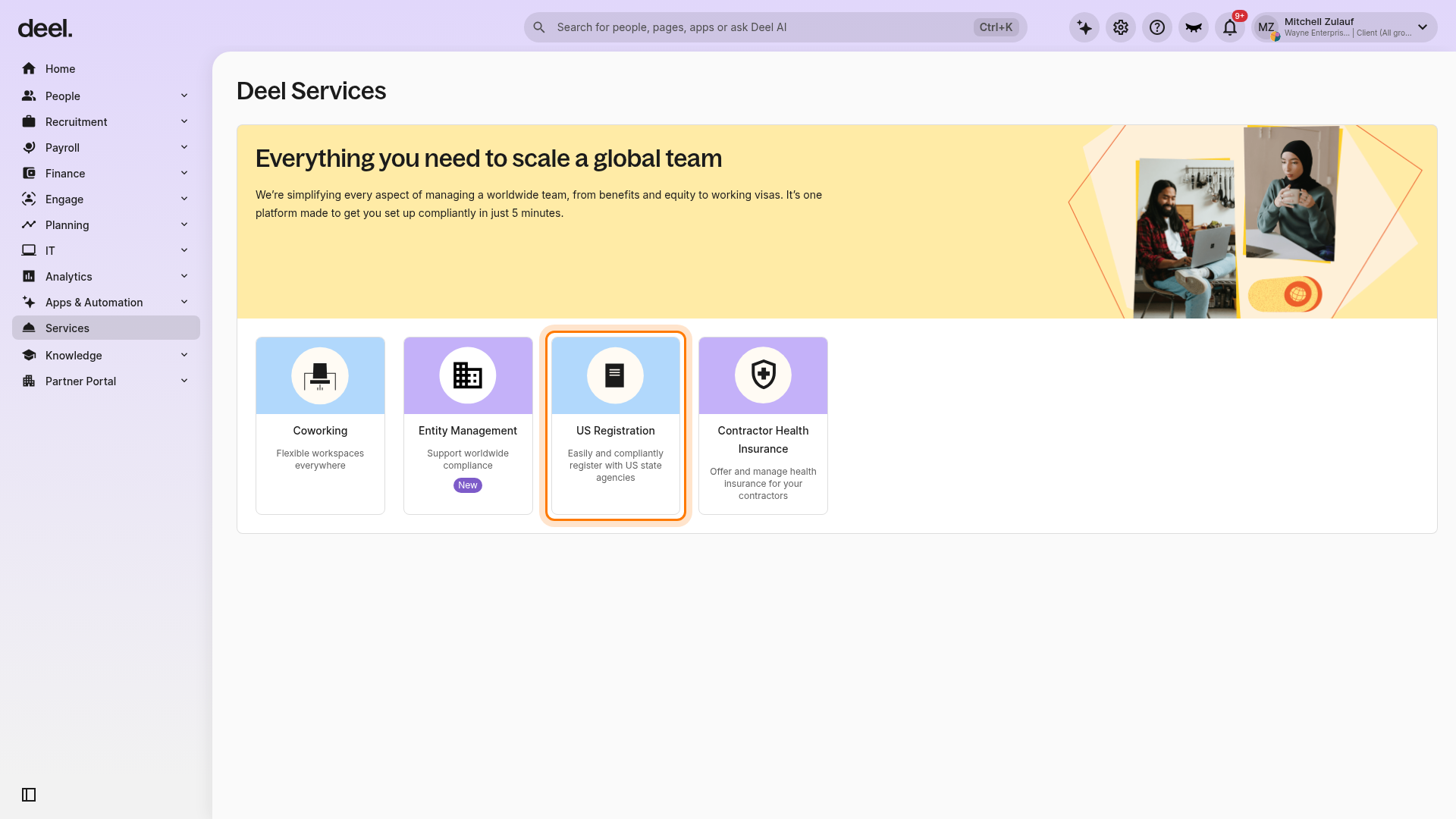
Locate and select the US Registration card, described as “Easily and compliantly register with US state agencies.” Scroll down if the card is not visible.
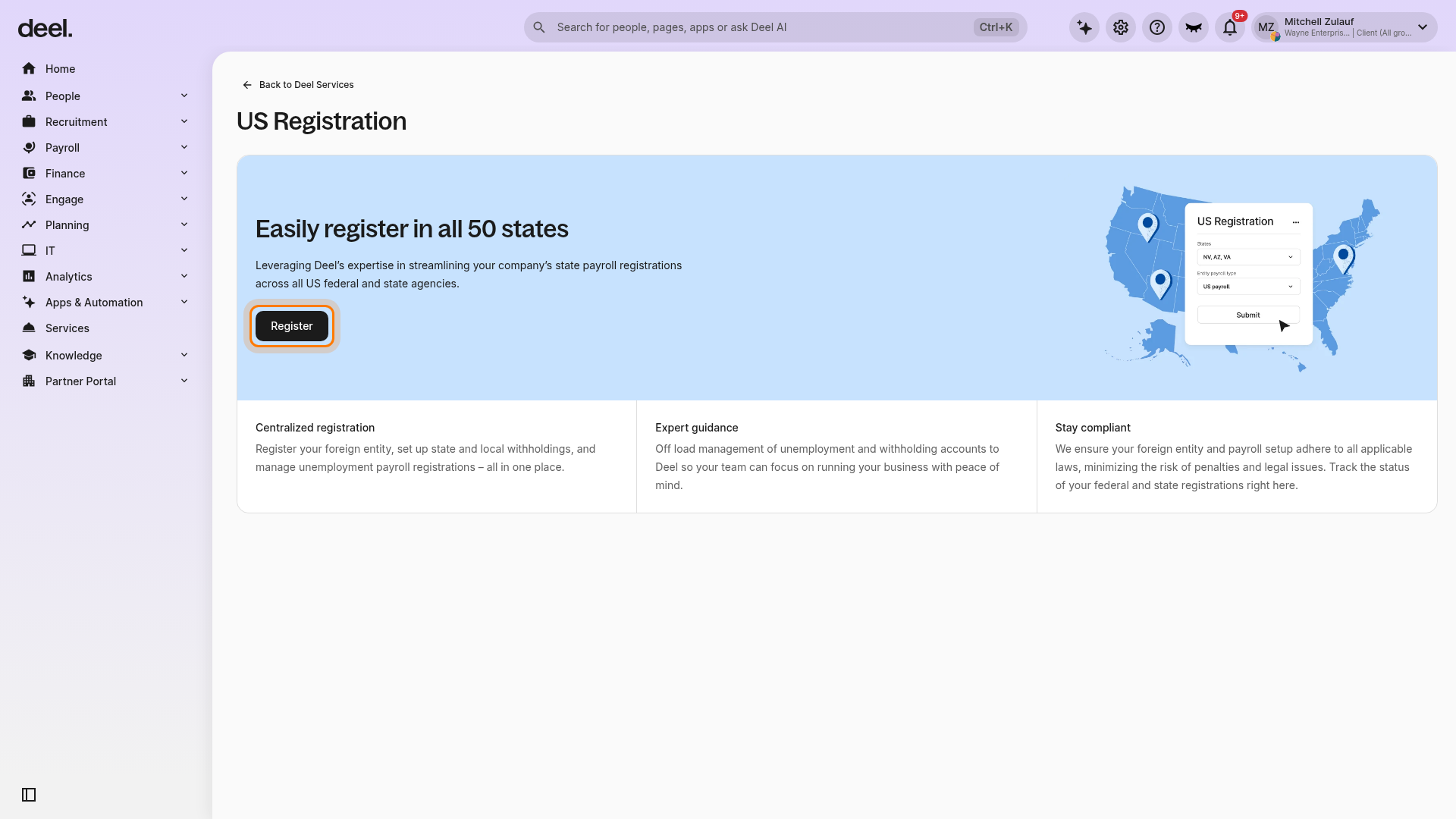
On the US Registration page, select Register in the blue Easily register in all 50 states section.
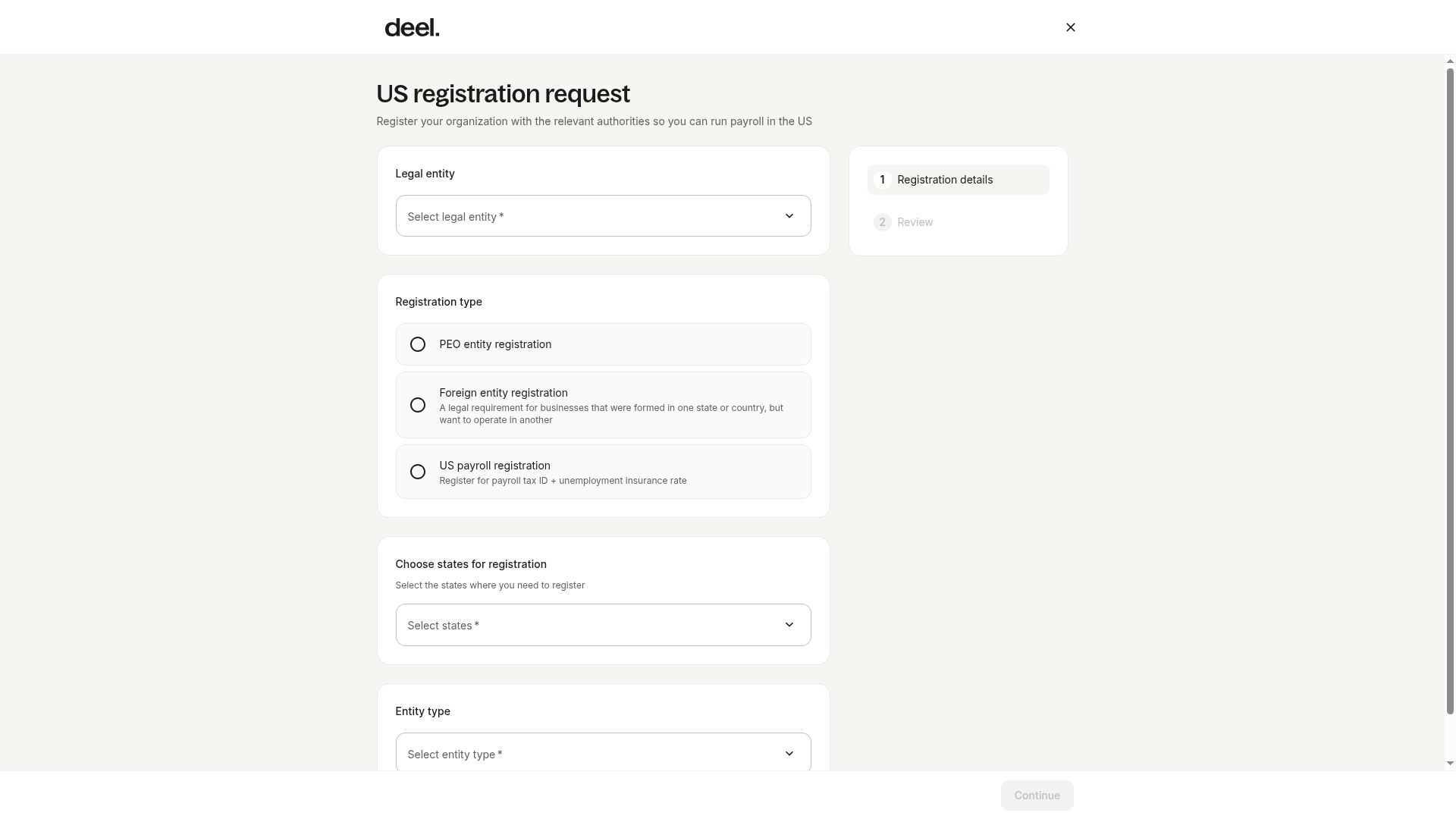
The US registration request form opens at Registration details. Select the appropriate legal entity, registration type, states, and entity type, then continue through the review step and submit the request.
Deel Responsibilities
Deel will:
- Coordinate with the payroll provider to submit accurate and timely filings based on client-submitted data
- Notify you of any rejected filings and explain why they failed
- Refile taxes after the issue causing the rejection is resolved
- Prompt you to complete or update missing tax information on the platform before filing deadlines
How to Add Tax IDs
- Go to Settings > Organization > Entities
- Select the relevant entity
- Navigate to Licenses and Registrations.
- To add missing IDs, locate the registrations that have the Missing info tab, click on the registration name, and provide the necessary details.
- To update IDs, click on Edit.
How to Update Rate Information in the Deel App
- These Tax IDs must be provided in Deel:
- Go to Settings > Organization > Entities
- Select the relevant entity
- Navigate to Licenses and Registrations.
- Select the relevant registration, click View, then click Modify Rates.
- Enter the updated rate values and select the effective start quarter as provided by the state.
- Click Next to review the changes, then click Submit to finalize the update.
Review the registration details to confirm the changes have been applied successfully.
What Is TPA Access?
TPA (Third-Party Administrator) authorization allows Deel or the payroll provider to act on your behalf with federal, state, or local tax agencies. This includes the ability to log into your account, file taxes, make payments, and access account information.
Not all agencies require TPA access, but Deel recommends setting it up for all jurisdictions where it is available.
[ACCORDION] States Requiring Client Action for TPA Setup
Some agencies require the client to initiate or approve TPA access. If you have employees in the following states or jurisdictions, please contact your Customer Success Manager or the Support Team for assistance:
CO-DENVER, DC, DCSUI, IA, IASUI, ID, INSUI, KS, KSSUI, KY-Louisville, LASUI, MDSUI (BEACON), MNSUI, MO, NCSUI, NMSUI, OHSUI, PASUI, SCSUI, TXSUI
[/ACCORDION]
What Is a Rejected Filing?
Every quarter, your payroll provider submits tax filings to the appropriate agencies. A rejection occurs when the agency is unable to process the filing due to incorrect, missing, or conflicting information.
Common reasons for rejection include:
- Missing or incorrect Tax ID or EIN
- Missing TPA access or PIN
- Incomplete or inactive tax account
- Incorrect Social Security Number (SSN)
- Another provider already filed for the same period
Deel will alert you if a filing is rejected and let you know what needs to be fixed before we can refile.
How to Resolve Rejected Filings
-
Missing registration:
Register externally or through Deel’s platform by selecting Services in the left sidebar, then selecting US Registration. Once complete, request a refile through the Support team or your CSM. -
FEIN mismatch with agency records:
Contact the tax agency directly to correct your registration. Then notify Deel so we can refile. -
Another provider already filed:
Confirm with your previous payroll provider. If they filed, get a copy of the filing. Deel can submit an amended return if necessary. -
Incorrect or missing Tax ID:
Double-check the EIN or account number. Update it on the Deel platform, then request a refile. -
Inactive account:
Contact the tax agency to reactivate your account. Once reactivated, Deel can refile. -
TPA access not granted or incorrect:
Log in to your state tax account and update or approve the TPA request. Ensure Deel has full access to file and pay.
Contacting Tax Agencies
Use the interactive map provided by the Federation of Tax Administrators to find contact information for your state’s tax authority: