
You can withdraw your Deel earnings directly to your Alipay account in Chinese yuan (CNY). This article explains how to set up Alipay as your withdrawal method, gather required documents, submit your first withdrawal, and monitor its progress.
Before you begin
You must be:
- An independent contractor or COR based in China with an Alipay account
- Using a Deel account name that matches your Alipay account name exactly
- Withdrawing to your own Alipay account, as only first-party payments are supported
How to set up Alipay and withdraw your earnings
Step 1 - Open withdrawal methods
[ACCORDION] On the web:
- Log in to your Deel account.
- In the left sidebar, expand Finance.
- Select Withdrawal methods.
- Click Add withdrawal method.
[ACCORDION] On the Deel mobile app:
- Log in to your Deel account.
- Go to Profile, then Payment settings.
- Select Withdrawal methods.
- Click Add withdrawal method.
[/ACCORDION]
Step 2 – Select Alipay and enter your details
- Choose Alipay from the list.
- Enter your Alipay account details.
- Select CNY (Chinese yuan) as your withdrawal currency.
Step 3 – Save and activate your withdrawal method
- Click Save.
- Your withdrawal method is now active and ready for your next payment.
Note: Your Deel account name must match your Alipay account name exactly for withdrawals to succeed.
Step 4 - Locate your Contractor Agreement
[ACCORDION] On the web:
- Log in to your account.
- In the left sidebar, expand Profile.
- Open the Contracts section.
- Download your contract PDF.
[ACCORDION] On the Deel mobile app:
- Open the Deel app.
- Go to the Work section.
- Scroll down to Contract and open it.
- Tap the three dots (...) in the upper right.
- Select View Contract.
- Download or screenshot the sections you need.
[/ACCORDION]
Step 5 - Download your invoice
[ACCORDION] On the web:
- Log in to your Deel account. If a promotional or announcement pop-up blocks the sidebar, close it using the X in its upper-right corner.
- In the left sidebar, locate Finance and select its expand arrow.
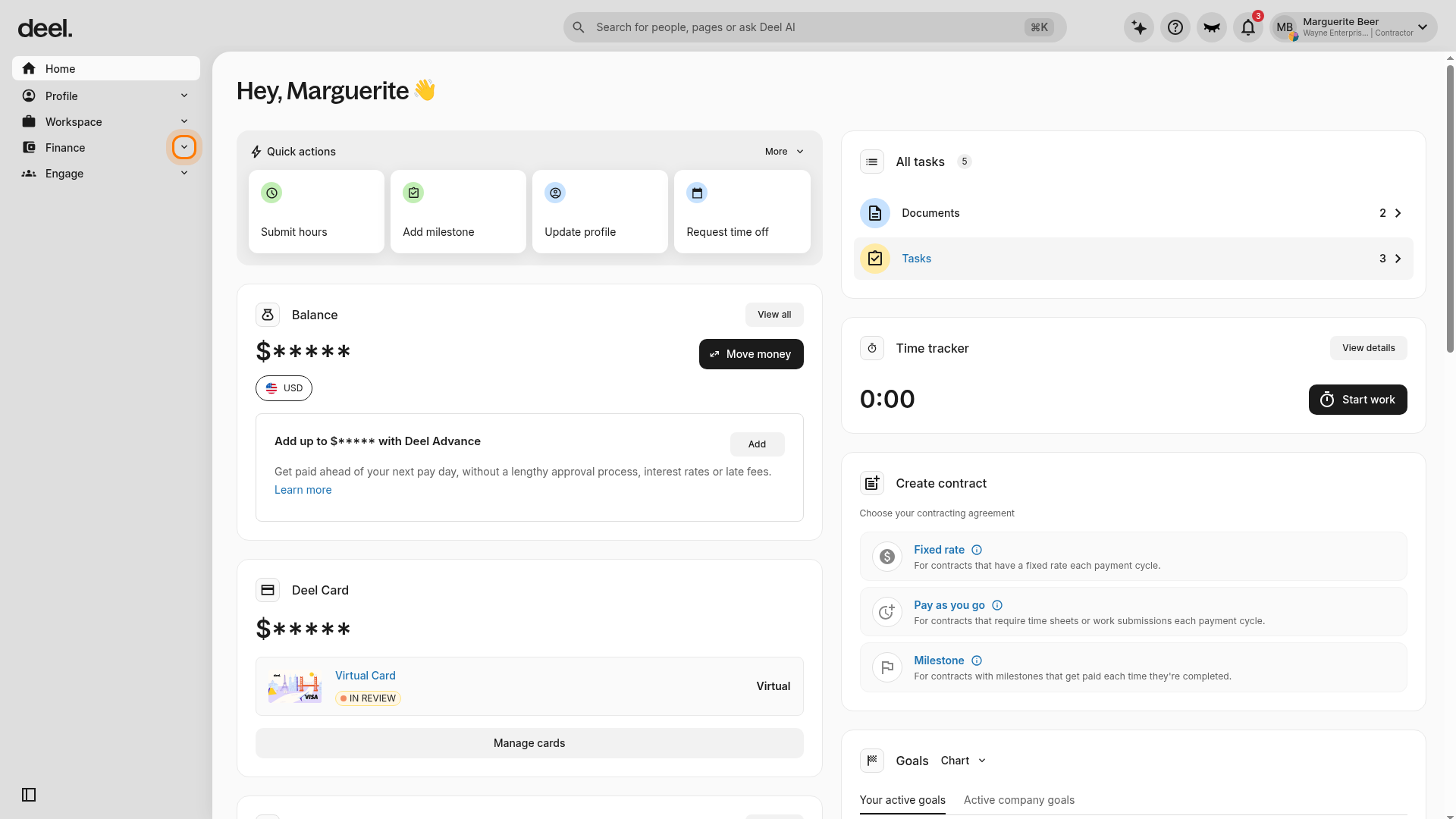
3. Confirm that the Finance submenu appears, then select Invoices.
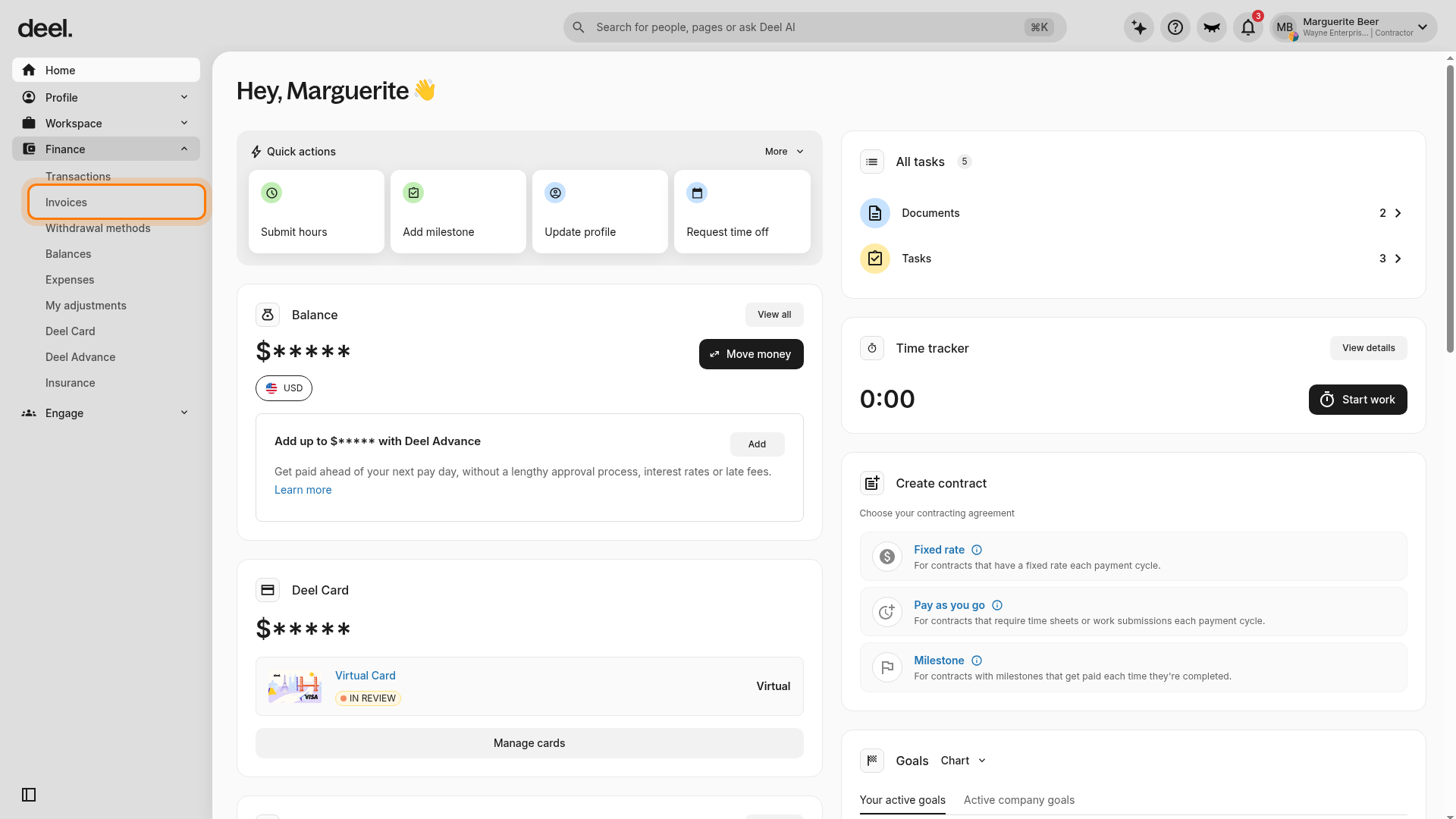
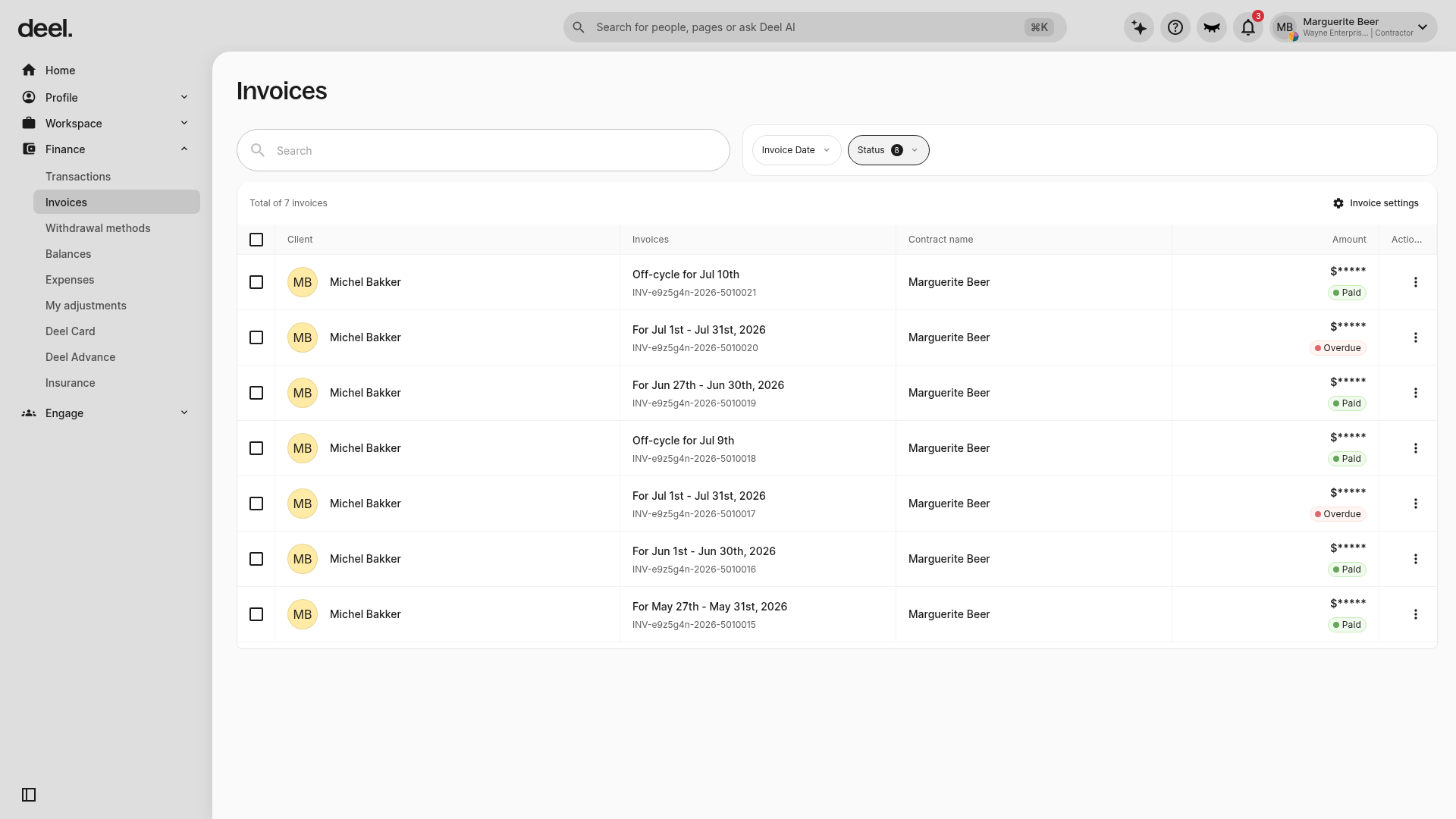
4. Wait for the Invoices page to load. You can confirm you are in the right place when the page heading reads Invoices and a searchable invoice table is visible.
5. Find the invoice you need.
6. Click the three dots (...) next to the invoice and select Download.
[ACCORDION] On the Deel mobile app:
- Open the Deel app.
- Go to Finance.
- Select Invoices.
- Find and open the invoice you need.
- Tap Download.
[/ACCORDION]
Tip: If Invoices is not visible on the web, select the arrow next to Finance again to expand the submenu. If the invoice table does not appear immediately, wait briefly for the page to finish loading.
Step 6 - Request your withdrawal and prepare for Alipay's response
What to do before you request a withdrawal:
- Enable Alipay notifications. Keep SMS and in-app push notifications switched on so you do not miss Alipay's request.
- Prepare the right invoice(s). The total invoice value available must cover the withdrawal amount.
- Use a clear original file or image. All key invoice details must be readable.
- Check the issue date. Every invoice you upload must have been issued within the last 12 months.
Important: Only you, the recipient, can respond to an Alipay Request for Information (RFI). Deel cannot upload the documents on your behalf.
Step 7 - Complete the Alipay RFI in 5 steps
After you request a CNY withdrawal to your Alipay account, Alipay may place the payment under review and send you a Request for Information (RFI). Look for an SMS and an in-app notification from Alipay. Open the request and complete the steps in the next 24 hours.
- Open the notification promptly - Alipay will contact you by SMS and through an in-app push notification. Open the request in your Alipay app. If you do not respond within 24 hours, the payment will be rejected.
- Check the payment purpose - do not change it - The payment purpose should remain "Service Payment". Do not change it to "Salary payment" or another option during the RFI flow.
- Select the correct invoice or invoices - Choose invoice(s) linked to the funds you are withdrawing. You can upload up to five invoices in a single RFI. The withdrawal amount should be equal to or less than the invoice(s).
- Upload clean, complete documents - Upload a clear, high-quality invoice file or image. English is accepted. Do not add notes, highlights, marks, edits, filters or other image processing.
- Review and submit within 24 hours - Check that every detail is readable and that you selected the correct current invoice(s). Submit the RFI and continue watching Alipay for any follow-up request.
Important: You do NOT need a contractor agreement. For Deel payments, Alipay requires the relevant invoice(s) only, whether this is your first withdrawal or a later one.
Step 8 - What happens after you submit
- Alipay reviews the documents. The standard review target is within 24 hours after submission.
- Alipay may ask for more information. If another request arrives, respond within the new 24-hour window.
- The full RFI journey can take up to 96 hours. A payment can remain pending while the review is in progress.
Invoice Checklist
| DO ✓ | DO NOT ✗ |
|---|---|
| Use the correct invoice for the withdrawal | Reuse an invoice whose full value was already used |
| Make every detail clear and readable | Upload an old or unrelated invoice |
| Upload the complete invoice | Crop out important details |
| Use invoices issued within the last year | Add notes, highlights or mark-ups |
| Keep track of any invoice value already used | Use a blurry or image-processed copy |
Match Invoices to the Withdrawal Amount
| Situation | What to upload | Key rule |
|---|---|---|
| One full withdrawal | One invoice that covers the full amount | Invoice value must be at least the withdrawal amount |
| One invoice, split withdrawals | The same invoice may be used again while unused value remains | Across all withdrawals, do not exceed that invoice's total value |
| Withdrawal exceeds one invoice | Multiple invoices whose combined available value covers the amount | You can upload up to five invoices in one RFI |
Simple check: Before submitting, calculate: total available invoice value minus value already used. The result must cover this withdrawal.
If Your Payment Is Rejected
- First step: Read the reason shown in Alipay. If the issue is a document problem, correct it for a new withdrawal: use the right invoice(s), keep the purpose unchanged and submit within the deadline.
- For compliance or safety reviews: Contact Alipay Support through the official support option in your Alipay app. These decisions are made by Alipay, and Deel may not receive the underlying reason or be able to change the decision.Caution: You have only 24 hours to upload documents. Missing the deadline will cancel your withdrawal. A countdown on your Alipay order page helps you track this deadline.
Frequently Asked Questions
[ACCORDION]Do I need to upload documents for every withdrawal?
No. You only need to submit your invoice(s) when Alipay requests them (RFI). If your withdrawal is not flagged for review, you won't need to submit any documents.
[ACCORDION]Can I withdraw to someone else's Alipay account?
No. Deel only supports first-party withdrawals. Your Deel account name must match your Alipay account name exactly.
[ACCORDION]What if my Deel account name doesn't match my Alipay account name?
Contact Deel support to update your account name before setting up Alipay. Names must match exactly for withdrawals to succeed.
[ACCORDION]What happens if Alipay rejects my payment?
Your funds are refunded to your Deel account. Read the reason shown in Alipay. If the issue is a document problem, correct it for a new withdrawal: use the right invoice(s), keep the purpose unchanged and submit within the 24-hour deadline. For compliance or safety review issues, contact Alipay Support through the official support option in your Alipay app.
[ACCORDION]What if I miss the 24-hour upload window?
Your order closes automatically and the funds return to your Deel account. You can initiate a new withdrawal, but respond more quickly next time to avoid delays.
[ACCORDION]Can I use multiple invoices for one withdrawal?
Yes. You can upload up to five invoices in a single RFI. The combined invoice value must cover your withdrawal amount.
[ACCORDION]Can I use the same invoice for multiple withdrawals?
Yes, as long as you haven't used up its full value. Track how much of each invoice's value you've already used across withdrawals, and make sure the remaining available value covers your new withdrawal.
[/ACCORDION]
Troubleshooting
Common Rejection Reasons
| Common Rejection Reason | How to avoid it |
|---|---|
| Purpose changed in the RFI | Leave the purpose as "Service Payment". Do not switch it to "Salary payment". |
| Old or already fully used invoice | Use a current, relevant invoice issued within the last 12 months. Track how much of its value has already supported earlier withdrawals. |
| Invoice is unclear or incomplete | Upload the full document at a readable quality. Make sure names, dates, descriptions and amounts can be clearly seen. |
| Invoice appears modified | Use the original file or a clean image. Do not add annotations, highlights or image edits. |
| Invoice value does not cover the withdrawal | Add valid invoices so their combined available value covers the entire amount. Maximum: five invoices per RFI. |
Finding Features in the App
| Problem | Did you try? | How to fix |
|---|---|---|
| Alipay requests are rejected on first submission | Confirming your Deel and Alipay account names match exactly | Update your Deel account name in Profile settings to match your Alipay account name. |
| Cannot find your Contractor Agreement in the app | Checking the Work section and scrolling all the way down to Contract | If Contract is not visible, contact Deel support—the agreement may not be uploaded yet. |
| Cannot find Invoices on the web | Checking whether the Finance section is expanded in the left sidebar | Select the arrow next to Finance to reveal its submenu, then select Invoices. |
| A pop-up blocks the Finance sidebar option | Closing the pop-up | Select the X in the pop-up's upper-right corner, then expand Finance. |
| The invoice table does not appear | Waiting for the Invoices page to load | Wait briefly and confirm that the Invoices heading is displayed before continuing. |
| Upload deadline timer shows zero time remaining | Checking your system clock and time zone settings | Ensure your device time is correct and upload immediately; your system clock may be ahead of Alipay's server time. |