
This article explains how independent contractors can manage contracts through Deel.
For independent contractors looking for information on uploading or adjusting invoices, please see our Guide to Contractor Invoices.
In this article:
Types of contracts
Deel offers three contract types that can be reviewed and signed with a client. Once a contract is signed, contractors can review the contract details on the Deel app.
Fixed Rate contract
A fixed-rate contract is a contract where the contractor and the client agree to a predetermined base rate for work, which recurs each pay cycle.
With a fixed contract, contractor will get paid in the payment cycles that they and the client agreed on in the contract: weekly, bi-weekly, every other week, or monthly.
The payment cycle and the pay date are listed in the contract.
Please see: How To Create A Fixed Rate Contract On Deel
Pay As You Go contract
A Pay As You Go contract is a contract where contractors are paid at a variable rate that depends on factors such as "hours worked" or "tasks".
With a Pay As You Go contract, contractors may need to submit their hours before the client can issue the payment.
Contractors can adjust their invoice to add a bonus, expense, overtime, and other adjustment types for each payment. The client can approve the hours, add a bonus, and update hours by CSV upload (if applicable).
Please see: How To Create A Pay As You Go Contract On Deel
Milestone contract
A milestone contract is a contract where the independent contractor is paid a predetermined amount when they reach particular milestones along a project timeline.
With a milestone contract, contractors and their clients will break down the project into milestones and assign a payment amount to each of them. Then, when a milestone is approved, the payment can be processed.
Please see: How To Create A Milestone Contract On Deel
Contractors Paid Outside Deel
Contractors Paid Outside Deel are a unique worker type designed to provide clients with a comprehensive solution for managing individuals hired through external agencies or providers.
Contractors Paid Outside Deel in Deel HR are a versatile worker type that allows clients to seamlessly incorporate individuals hired through agencies or providers into their workforce management system.
Contactors Paid Outside Deel should keep in mind that they do not have a Deel-compliant contract and are not paid through the Deel platform.
Note: This option will only be available to Clients if Deel HR is activated.
Please see: How To Create A Contract Paid Outside Deel?
How to view contract details
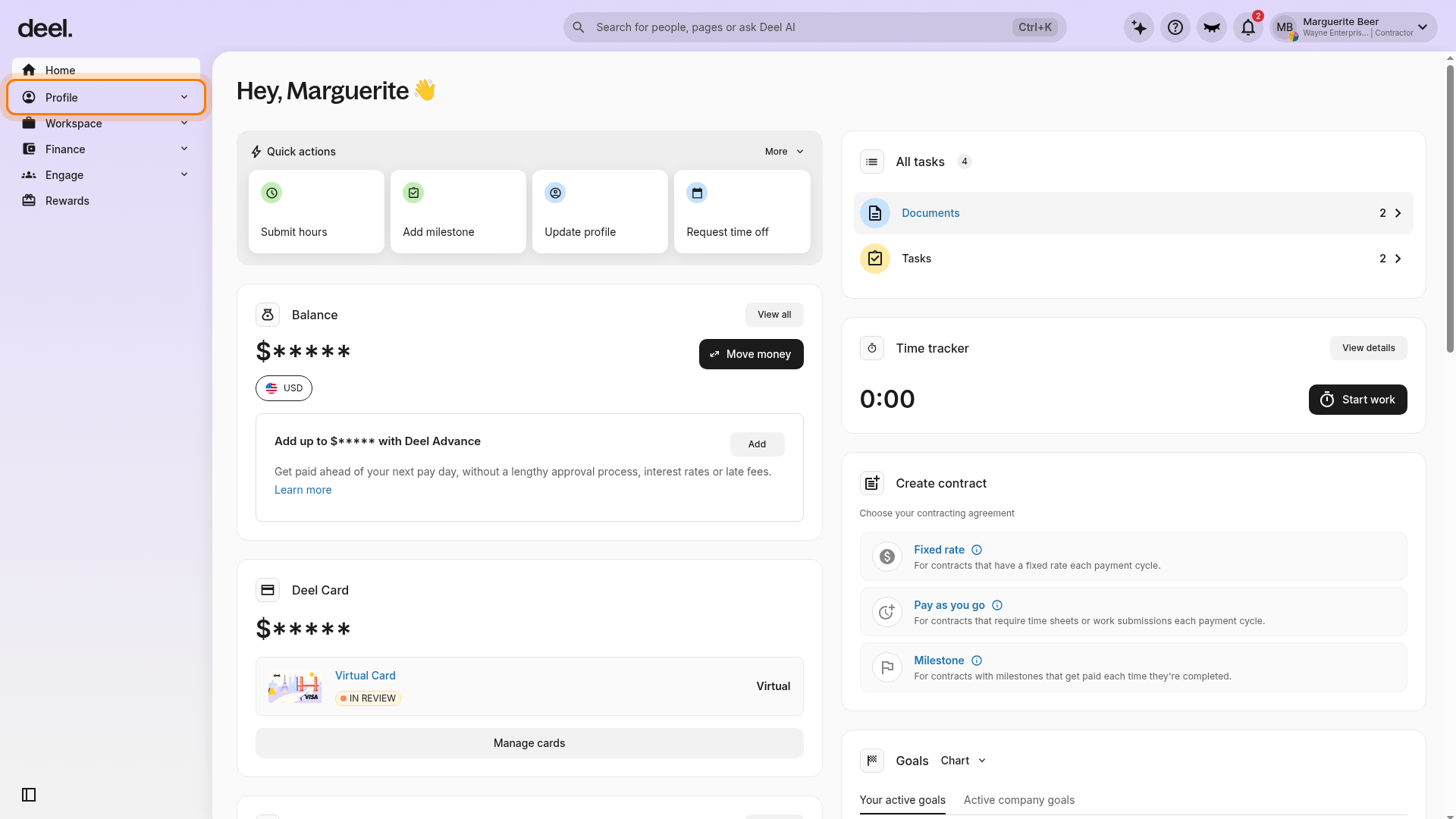
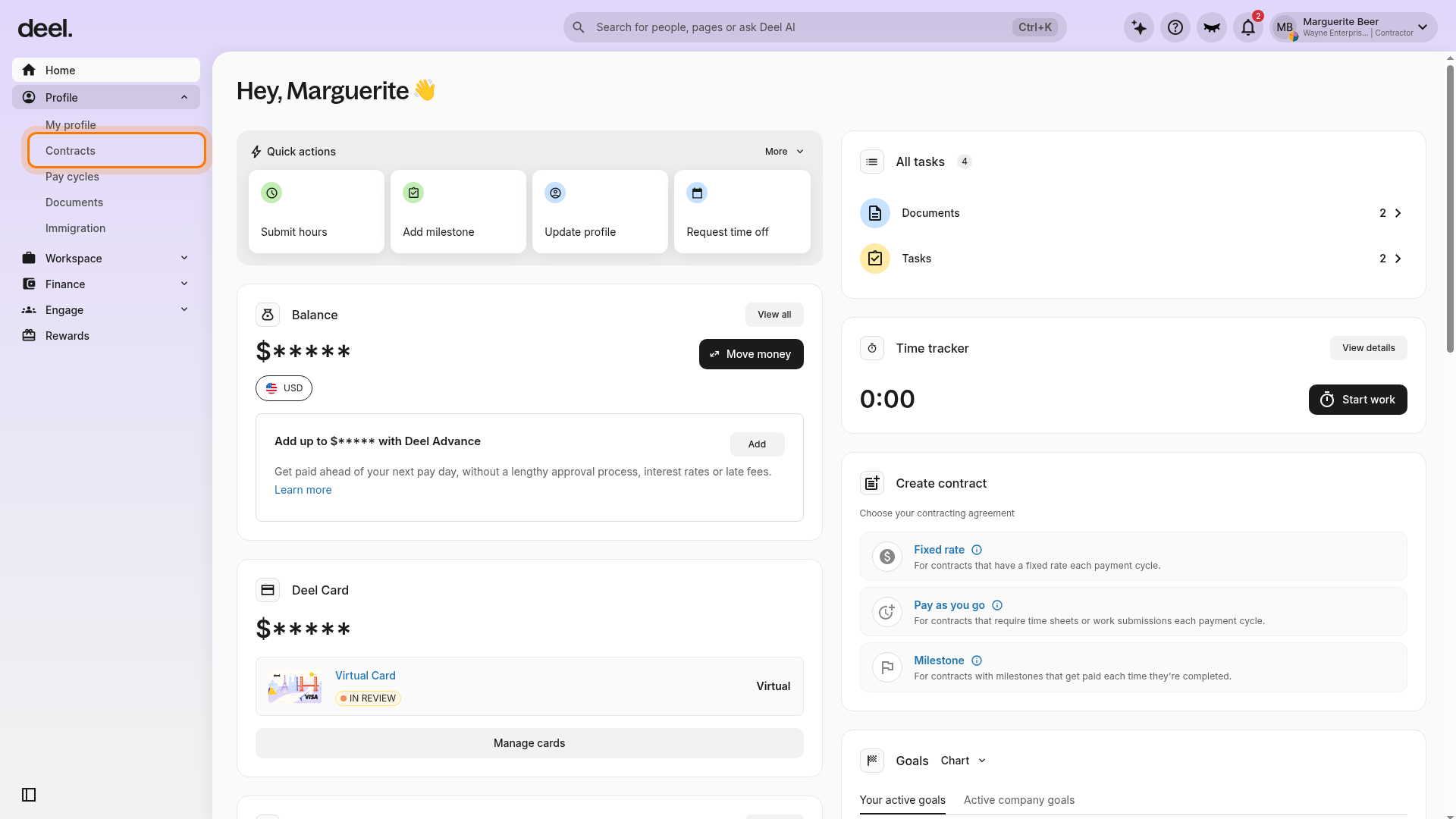
The details of a contract can be reviewed at any time by selecting Profile in the left sidebar, then selecting Contracts.
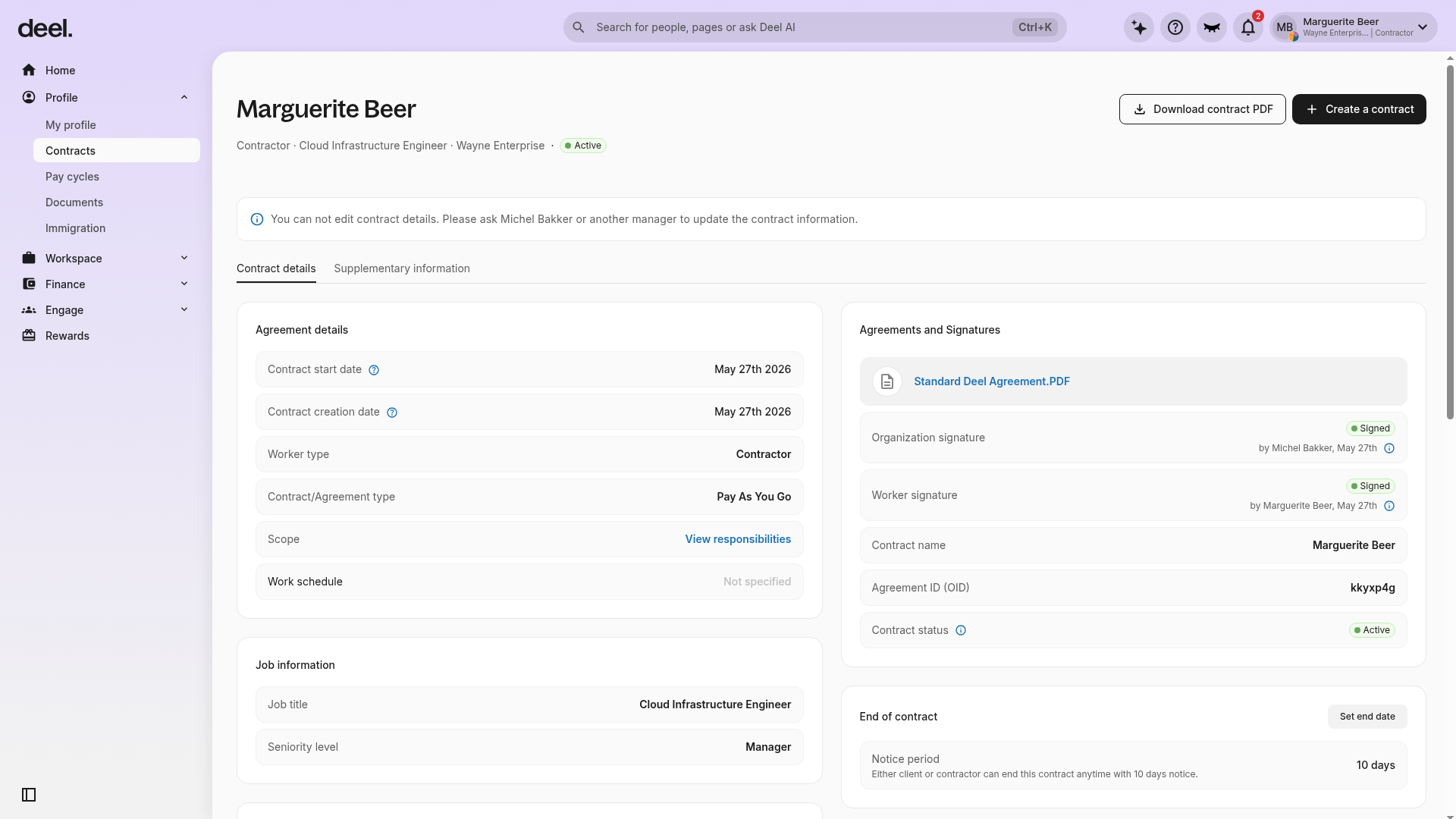
You can find information such as the start and end date of the contract, payment details, job role, agreement details, and signatures.
- Select Profile in the left sidebar to expand its menu. The menu includes options such as My profile, Contracts, Pay cycles, and Documents.
- Select Contracts in the expanded Profile menu. The Contracts page opens and shows a list of available contracts, including each contract's type, amount, and status where applicable.
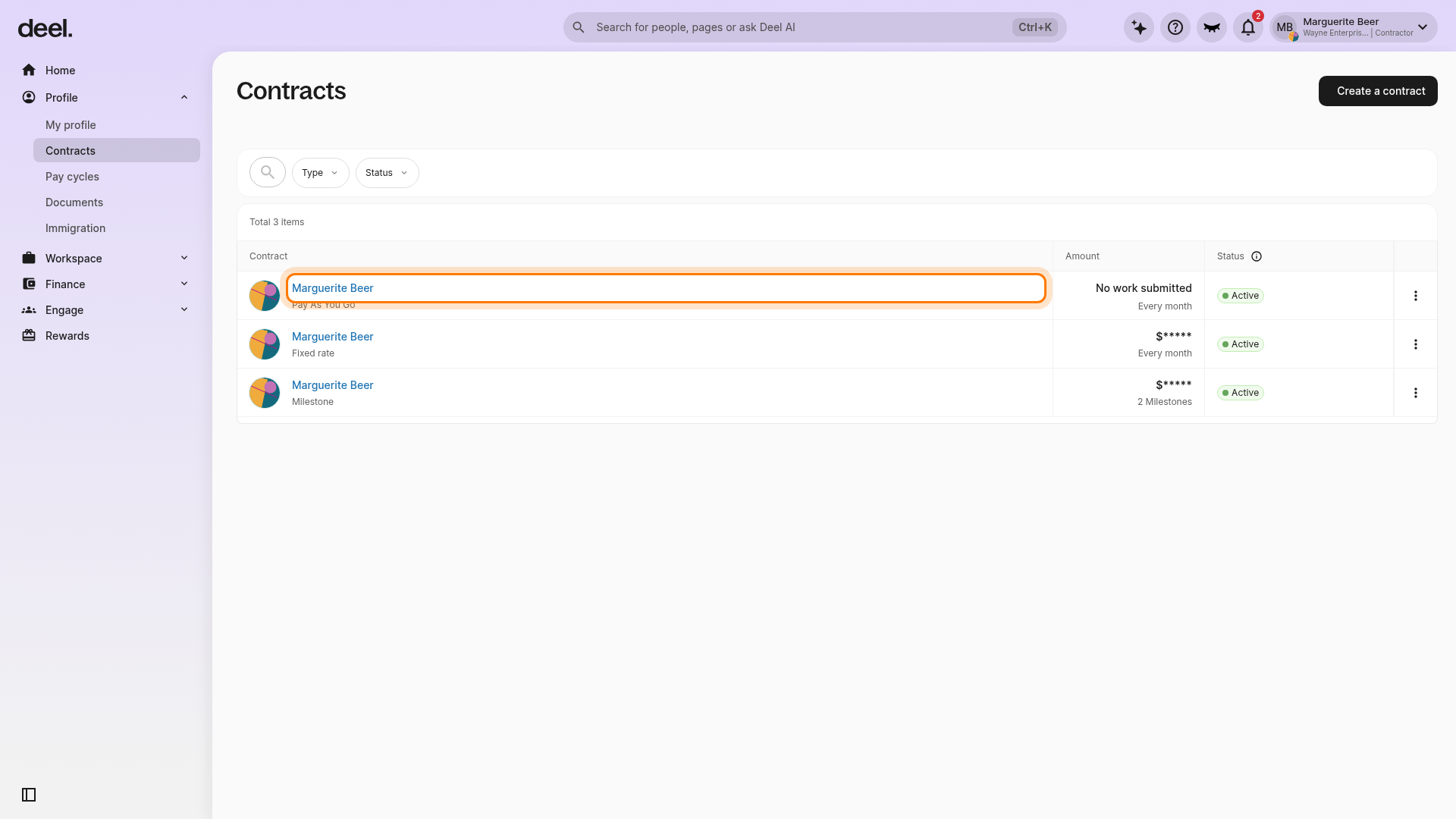
- Select the contract name you want to review in the Contract column, rather than the three-dot menu at the end of the row. If more than one contract has the same name, use the contract-type label beneath the name, such as Pay As You Go, Fixed rate, or Milestone, to identify the correct agreement.
- Confirm that the Contract details tab is selected. The page displays Agreement details and Agreements and Signatures, and may also show payment details, job role, contract status, and end-of-contract information where applicable.
FAQs
[ACCORDION] Can contractors edit their contract details?
No, contractors cannot edit contract details. Please contact the client to update the contract information.
[ACCORDION] Where can contractors find their contract termination details?
To find the contract termination date, select Profile in the left sidebar, select Contracts, and open the relevant contract.
On the Contract details tab, navigate to the End of contract section. The contract's End date will be listed, if applicable.
[ACCORDION] Why can't contractors submit their hours?
With a Pay As You Go Contract, the Submit work section will not appear if the client enabled the Only Client Can Submit Work option during contract creation.
In this case, only the client can submit hours. Contractors can check if their client enabled this option for their contract in the Contract Details tab.
[ACCORDION] What should contractors do to settle client-contractor conflicts?
We encourage our clients and contractors to try and settle conflicts between themselves. The contract is an agreement between the contractor and the client, and Deel does not mediate any disputes.
Please read our full disclaimer here.
[ACCORDION] Can contractors terminate their own contract without client approval?
The default setting on Deel is that Independent Contractors can terminate their own contracts on the Deel platform if they wish.
However, clients are able to disable the ability for contractors to terminate their own agreements.
If you would like to terminate an active contract and are unable to do it on the platform, please contact us 24/7.
[ACCORDION] Can stocks be issued to an Independent Contractor?
Yes! Deel allows clients to grant an equity promise to both full-time employees and independent contractors.
Clients will use their equity platform solution to grant equity.
If the employer is offering stock options, contractors will be able to see the offer from their home page.
✅ Step 1 – Navigate to Home. If you see a Stock Options widget on the dashboard, click View to open the offer directly.
✅ Step 2 – Alternatively, use the navigation available in your account to open the Compensation area, then select Stock Options.
✅ Step 3 – Review Stock Options Offered to see pending offers. The page can also show Stock Options Granted.
✅ Step 4 – Open an offer to review its details, including aggregate value, vesting schedule, and cliff.
Troubleshooting: Can’t see the Stock Options tab?
If you followed the steps above but do not see a Stock Options tab or section, try the following:
- Check feature availability – The Stock Options module must be enabled on the client’s account. If the feature is not enabled, the tab will be hidden for all users.
- Verify your permissions – You may not have the required role or permission to view equity information. Ask your client or employer to confirm your access level.
- Confirm an equity promise exists – The tab appears only when at least one equity offer has been created for you. If no promise exists yet, the tab will be hidden.
- UI changes – Deel regularly updates its interface. If the navigation you see does not match the options above, look for the Compensation area in the navigation available in your account or contact Support.
- Still need help? Take screenshots of what you see and reach out to Deel Support – they can confirm whether the feature is enabled and guide you to the correct page.